


From MQLs to Buying Groups: How Palo Alto Networks Modernized Its GTM Engine
A conversation with Jeremy Schwartz, Sr. Manager, Global Lead Management & Strategy at Palo Alto Networks
In a rapidly evolving B2B landscape, where multiple stakeholders now shape buying decisions, relying solely on traditional MQL-based models no longer cuts it. At Palo Alto Networks, Jeremy Schwartz, Senior Manager of Global Lead Management & Strategy, has been spearheading a transformation—shifting the company from an outdated lead-centric model to a buying group-focused motion.
This move hasn’t just modernized their go-to-market strategy; it’s delivered tangible business results. In this blog, we break down Palo Alto Networks’ journey, the challenges they faced, and the playbook they followed to build a scalable, revenue-generating buying group engine.
The Problem: A Funnel Full of Waste
Jeremy had a front-row seat to the inefficiencies of the MQL model. From his experience as a campaign strategist and now as a lead management leader, one thing was clear: MQLs were often vanity metrics.
“You drive great MQLs that either don’t convert or get thrown back. The lowest person on the totem pole is often the MQL—and sales doesn’t want to waste time on them.” – Jeremy Schwartz
Campaigns generated leads, but many never matured into opportunities. Even when they did, sales would frequently reject them, seeing little value in a lone networking admin reaching out.
The funnel was leaking at every stage.
The Aha Moment: Forrester’s B2B Revenue Waterfall
The real turning point came when Jeremy attended a Forrester conference and learned about their B2B Opportunity Waterfall model. It flipped the focus from individuals to buying groups.
Inspired, Jeremy returned and pitched the idea internally. His leadership responded with: “Run a pilot and show us what you find.”
Phase 1: Building the Pilot
Palo Alto’s pilot kicked off with a 3-month research phase. The team mapped out what people, processes, and systems would be impacted, then aligned with Forrester to tailor the buying group model to their environment.
People First
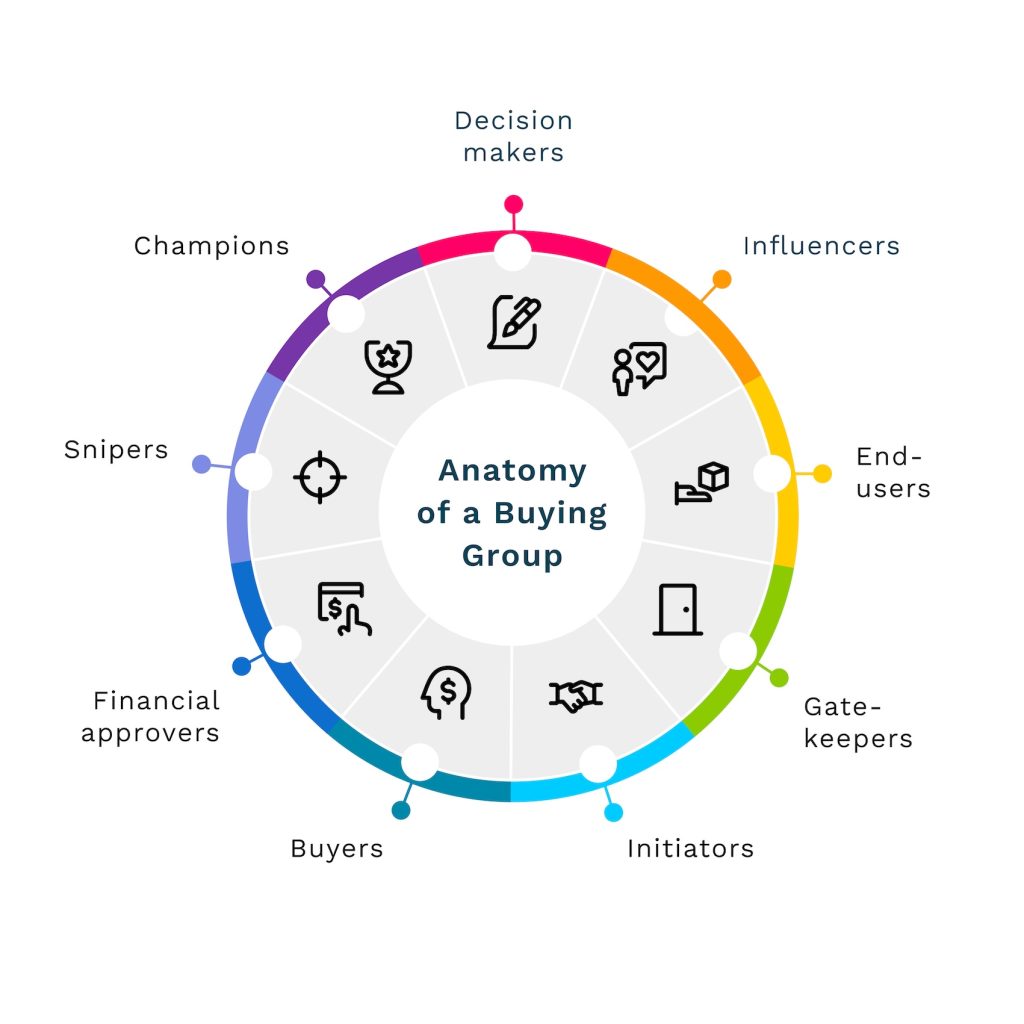
They recruited BDRs across multiple GTMs (product go-to-markets), geographies, and segments to get a representative pilot group. At the same time, they analyzed two years of closed-won data to identify real buying group personas.
“You don’t need to hire a consultancy to identify your buying groups. Look at your closed-won data—it’s all there.” – Jeremy Schwartz
Process Discovery
They identified two key BDR motions:
Create new opportunities with multiple stakeholders.
Add new engaged personas to existing opportunities.
Both processes, however, were painfully manual—10+ steps each.
Phase 2: Launch and Learn
They ran the pilot for a full quarter. Initial triggers still came via MQLs, but BDRs were trained to:
Check intent platforms (like Demandbase)
Identify other engaged personas at the same account
Multi-thread their outreach
This approach led to:
More meetings booked
Better response rates (especially when referencing colleagues)
Higher acceptance by AEs (thanks to meetings involving multiple roles)
“Mentioning a colleague in an outreach email is real personalization. And it worked.” – Jeremy Schwartz
The kicker? Deals with multiple stakeholders started closing—faster and at higher values.
They presented the early pilot results to their CMO. The response?
“That’s cute.”
So the team partnered with data science to extrapolate the results across all opportunities. The model predicted a 13% revenue lift—assuming full buying group coverage.
That got attention.
“Suddenly, our CMO said, ‘Do more of that.’” – Jeremy Schwartz
Phase 3: Automation and Scale
To make the process scalable, they built automation in their internal cloud app:
When a lead was accepted by a BDR, the system automatically identified other engaged personas from that account.
These individuals were assigned to the same BDR for follow-up.
Adding someone to an existing opportunity became a one-click process that even notified the AE.
They also created custom dashboards to track metrics like:
Number of opportunities with buying groups
Deal size and velocity
Incremental pipeline created
Coverage across accounts and products
By the end of their fiscal year, these automations were live globally across all BDR teams.
Results That Mattered
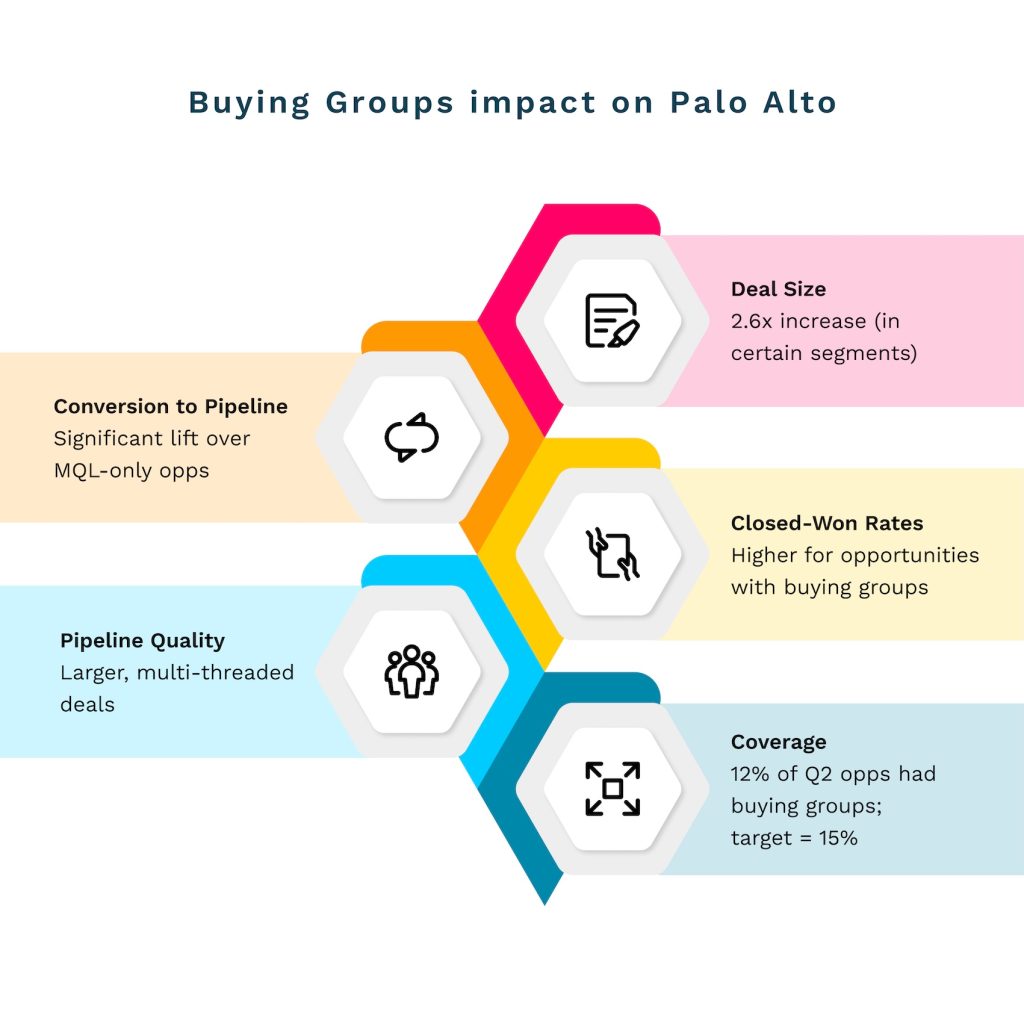
Here’s what Palo Alto Networks achieved by moving to a buying group model:
They also introduced new marketing metrics:
Campaign-to-Opportunity: Replacing MQL-to-Opportunity
Buying Group Coverage: How many personas per deal
Buyer Representation Spread: Ensuring campaigns target multiple personas, not just admins
“Our leadership is still MQL-obsessed, but now we’re reporting incremental pipeline and seeing influence in closed-won deals.” – Jeremy Schwartz
Building the Future: A Signal-Based Scoring Model
Palo Alto’s next frontier? Replacing lead scores with signal-based models using four dimensions:
Fit: ICP match
Intent: 1st, 2nd, and 3rd-party signals
Engagement: Website visits, downloads, event participation
Completeness: Buying group coverage per account
“If three or more people are showing up from an account, with different titles, that’s a signal. You don’t wait for an MQL to act.” – Jeremy Schwartz
Lessons Learned: What Jeremy Would Do Differently
Push for executive alignment earlier
Involve campaign marketers sooner after pilot results
Don’t overdesign—start small, learn fast, course-correct
Accept the reality of system complexity (especially in older enterprises)
“Martech stacks are like Rome—layers upon layers built by different people over time. Nothing is clean.” – Jeremy Schwartz
Advice for Companies Starting the Journey
Start small with a controlled pilot.
Use your own data to identify buying groups.
Get BDRs involved first—they’re closest to pipeline creation.
Automate before scaling.
Show revenue impact, not just lead volume.
“Even if your leadership still chases MQLs, show them better conversion, deal size, and real revenue impact. That’s what moves the needle.” – Jeremy Schwartz
Final Thoughts
Palo Alto Networks didn’t just adopt a trendy new model. They operationalized a seismic shift in how revenue is created—by recognizing buying groups as the real unit of conversion in B2B.
Whether you’re just starting or halfway through your own transformation, Jeremy’s journey is a masterclass in strategy, persistence, and practical execution.
Want to hear more stories from revenue leaders? Subscribe to The Revenue Lounge podcast to never miss an episode!
More Resources

How to Strategically Engage and Conquer Buying committees
Delve into the complexities of engaging buying groups and unveiling strategic approaches to conquer the challenges that arise. In Sales, the key to accelerating deals lies in understanding the nuances of buying group dynamics.
Top 15 Guided Selling Tools for 2025
Top 15 Guided Selling Tools for 2025 RevOps 10 min Imagine that you are planning to build a new house but are unsure where to start. You have a basic idea of what you want but are not an expert in home construction or design. In such a situation, you would need a skilled architect who understands your needs, preferences, and budget and then guides you through designing your dream home. The architect would help you make informed decisions about your new home’s design, materials, and features. Similarly, a guided selling tool uses customer data and sales expertise to help customers navigate the purchasing process and make informed decisions. It can provide personalized recommendations based on the customer’s needs and preferences, answer questions, and offer advice to help them choose the right product or service. What is Guided Selling? Guided selling is a strategy involving a structured approach to lead potential customers through the sales process. It is the process of analyzing current sales, historical sales, and customer data to help sales reps provide tailored product recommendations to customers and increase the likelihood of conversion. Let’s say you are shopping for a new laptop. You visit a website that offers guided selling, and you’re prompted to answer a series of questions. The questions might include things like: What will you primarily use the laptop for? Do you need a large screen or a lightweight design? How important is battery life to you? What is your budget? Based on your responses, the website would then recommend a few different laptops that meet your needs. It might provide detailed information about each laptop, such as the processor, RAM, and storage capacity, as well as customer reviews and ratings. The website might offer additional guidance, such as recommending accessories or providing information on warranties and support. Throughout the process, the focus is on helping you make an informed decision based on your unique needs and preferences. Guided selling can be particularly effective for complex or high-value products or services where customers may require more personalized guidance and support to make informed purchasing decisions. By providing a more consultative sales approach, guided selling also helps to establish long-term customer relationships. How Does Guided Selling Work in B2B SaaS In B2B SaaS, guided selling typically involves a sales representative or a customer success manager who guides the customer. The process usually begins with the customer expressing their needs and goals and the guide using that information to suggest relevant products or services. The guide may use various tools, such as a software demo, to help the customer understand the features and benefits of each option. In addition, guided selling often involves providing educational resources to the customer to help them better understand the product or service and how it can help them achieve their goals. This may include case studies, white papers, or other content that provides valuable insights into the benefits and use cases of the product. Let’s have a look at the guided selling process in detail: The Process of Guided Selling Tools The guided selling process is a customer-centric approach to sales that involves guiding potential customers through the buying process by providing personalized recommendations, advice, and support. The following are the general steps involved in a typical guided selling process: 1. Gathering customer information The first step of the process involves collecting data on the customer’s needs, preferences, budget, and any other relevant information that can help the sales process. 2. Identifying customer pain points In this stage, the sales team uses the information gathered in the previous stage to identify the customer’s pain points or areas of concern.This is typically done through a series of questions or a needs assessment. 3. Providing product recommendations Based on the customer information and pain points identified, the sales team provides recommendations on the products or services that best meet the customer’s needs. 4. Presenting solutions At this stage, the sales team presents the recommended products or services to the customer and explains how they address the customer’s pain points. The sales representative provides information about the recommended products or services, including their features, benefits, and pricing. 5. Handling objections If the customer has any objections or concerns, the sales team addresses them and provides additional information or alternative solutions as needed. 6. Closing the sale Once the customer is satisfied with the recommended product or service, the sales team closes the sale by facilitating the purchase process. 7. Follow-up and customer support After the sale is complete, the sales team provides follow-up support to ensure the customer is satisfied with their purchase and offers any additional assistance or support as needed. Examples of Guided Selling Tools in Businesses Here are some examples of techniques of guided selling tools: 1. Automate sales playbook To ensure consistent performance, sales playbooks should be automated. Guided selling relies on a solid foundation of methodologies, blueprints, and plays that facilitate the sales process. It’s important to choose a solution that simplifies the playbook for sellers, allowing them to follow the plan and consistently advance deals easily. 2. Identify specific needs In some situations, customers may need a clearer idea of what they are looking for when they visit your website. In such cases, a brief questionnaire can be used to determine and guide their specific requirements. For instance, if you run an online clothing store, you could ask customers questions about their preferred fit and fabric to steer them toward products that best match their preferences. This approach can increase the likelihood of a purchase by helping customers make informed decisions based on their needs. 3. Real-time response For a guided selling software to be effective, it needs to be adaptable and flexible, able to react to changing circumstances in real time. At a fundamental level, ensuring that sales representatives remain attentive to communication and other sales activities can reduce the time it takes to close deals and result in higher revenue velocity. In other cases,
A 30-60-90 Day Guide for First-Time Directors of Revenue Operations
A 30-60-90 Day Guide for First-Time Directors of Revenue Operations RevOps 10 min Starting a new job as a Director of Revenue Operations is an exciting opportunity to make a significant impact on a company’s revenue growth. To ensure success in this role, it’s essential to have a strategic plan that guides your actions during the crucial first three months. Here’s a 30-60-90 day plan that will help you strategically manage revenue operations and drive sustainable growth. We recently spoke to Hassan Irshad, Director of RevOps at FEVTutor. He shared his approach to this powerful framework, demonstrating how each phase (30, 60, and 90 days) builds strategically upon the last to deliver alignment, trust, and sustained improvement. By breaking down complex goals into achievable milestones, the 30-60-90 day approach empowers RevOps leaders to initiate meaningful change without overwhelming teams. For all the RevOps leaders, it’s a way to approach change with purpose, driving measurable impact and laying the groundwork for long-term success. The 30-60–90 day framework must be an indispensable tool and here is how you can implement progressive, sustainable growth strategies from day one. First 30 days for a Director of Revenue Operations The purpose should be to gather insights and understand the organization, especially the needs and challenges of different teams. 1. Goals for first 30 days: i. Meet Key Stakeholders Meet with cross departmental teams like Finance, HR, and Sales to understand their goals, challenges, and priorities. ii. Document Everything Create a “lay of the land” document summarizing findings on different team goals, challenges, and processes. iii. Understand the Product Take product demos, listen to sales calls, and use tools that show how the product is sold. This helps in understanding the customer needs better. iv. Dive into Your CRM Understand your CRM (whether Salesforce or HubSpot) to assess how the data is organized. This is to check whether it’s easy to use, and identify immediate improvements. The CRM should be the central source of truth, with other tools supporting it. The data should be unified with easier adoption for the teams. v. Build Trust Internally Establish trust within your teams by listening carefully, asking questions about how RevOps can help, and addressing quick fixes to show you’re there to help. Having this trust shows them that you’re here to support their success. Quick wins, such as small fixes that make people’s jobs easier, helps in establishing credibility early. 2. Establish Clear KPIs i. Understanding Team KPIs It is important to ask you stakeholders about the KPIs that matter to understand their goals and what their expectations are. ii. Aligning KPIs Across Teams Different departments oftentimes work in silos. RevOps should strive to align these departments and check if these KPIs match the overall business objectives. Gaps must be closed if their KPIs don’t align. iii. Setting RevOps KPIs As you approach the end of the first 30 days, start establishing RevOps-specific KPIs that match company goals, which may involve metrics like revenue increase, conversion rates, or improvements in overall efficiency. 3. Tech Stack Audit Deep dive into the existing tools that your company is using. Identify all redundancies, and find opportunities to streamline the entire tech stack. i. Map Out Tools Compile a list of all tools used by teams, noting their purpose and how they work with the CRM. ii. Evaluate Use and Cost Determine if tools are actively used or if there are duplicates. Look for cost-saving opportunities by consolidating tools when possible. https://www.youtube.com/watch?v=sVDJ9KI1tGw&t=869s Next 30 days – Alignment and Control The next 30 days marks a shift from discovery to alignment. The goals should be to create cohesion between departments (e.g., Sales, Marketing) and laying down effective controls. The improvements need to be implemented without overwhelming the teams. This phase combines further exploration with actionable improvements with the primary task being bringing the teams into sync. 1. Ways to bring your teams together i. Encouraging cross-team collaboration by addressing silos and ensuring all teams work toward shared quarterly or company-wide goals. ii. By creating alignment, you help teams see RevOps as a support system rather than an enforcer. This keeps communication channels open and creates buy-in. iii. Based on your findings, introduce controls wherever needed to improve workflow. Example: If close dates aren’t being recorded properly, this could skew reports. Meet with sales, identify the root cause (e.g., manual data entry that is taking too much of a reps’ time), and provide solutions or tools to make their tasks easier. Ensure that controls are practical and developed with the trust built in the first 30 days. Foster internal consensus within teams so that these improvements are adopted seamlessly. 2. Navigate Organizational Politics (i) Barrier Removal Larger organizations may have internal politics or ingrained processes that resist change. Find an internal “sponsor” who trusts and supports RevOps initiatives and can authorize actions to navigate any resistance. (ii) Trust and Consistency As you implement changes, make sure your efforts consistently demonstrate how RevOps can make work easier and more efficient for everyone. 3. Evolving the Tech Stack (i) Assessing Tech Needs If tools aren’t fully integrated (e.g., a tool not writing data back to the CRM), identify their gaps and consider evolving the tech stack. (ii) Holistic View Use insights from the discovery and alignment phases to start envisioning necessary tech improvements that align with company goals. Beginning of the 90-Day Phase: Vision and Execution This phase, described as “Vision and Execution,” involves shaping and executing a strategy based on insights gathered from the discovery and alignment phases. a. Roadmap Creation Create a roadmap covering the next two quarters, focusing on long-term, high-impact changes that align with business goals. Use learnings based on stakeholder needs, organizational goals, and the findings from the first 60 days i. Set Priorities Collaborate with end users (Sales, Marketing, Customer Success) to understand their pressing needs and align the roadmap with these needs. ii. Strategic Execution Prioritize initiatives that will have immediate revenue impact or