
How Nektar Puts CRM Data Hygiene on Autopilot
- Product
- 11 min
- Updated: August 17, 2026
Data automation isn’t new. Zoom out and you’ll find plenty of solutions in the category: workflow automation tools like Zapier, Workato, and Syncari; digital adoption platforms like WalkMe and Whatfix, which offer automation capabilities of their own; and a long tail of sales tools that sync website leads into a CRM.
Fewer specialize in syncing emails into Accounts specifically, and fewer still handle syncing Contacts and Activity data into Opportunities, the handful that do generally offer it either through manual workflows or automated syncing that only reaches the Account level, not the Opportunity level.
Mastering genuinely zero-adoption, fully automated CRM data syncing requires deep expertise in three things: the objects and fields of a CRM and how they interact, the sales process nuances that interact with those CRM elements, and the ability to connect the two into real logical inferences. That third piece is the hardest, and it’s where Nektar is purpose-built specifically for contact and activity capture, backed by an extensive library of logical inference under the hood.
Here’s how it actually works.
Get our latest insights into your inbox

1. Depth and Breadth of Data, With Unmatched Sync Accuracy
Accurately Managing Data Sync in Accounts With Multiple Opportunities
Automated capture of contacts, emails, and events for an account with a single open opportunity is table stakes. The real power shows up as sales process complexity increases.
As companies scale, so do their sales motions. Teams start running multiple open opportunities on the same account: same product, new team; same product, new market; new product, same team; or some combination. Most existing data automation solutions, including tools outside revenue operations entirely, offer one of three syncing methods:
- Manual selection of the correct opportunity in an inbox sidebar, with some fields auto-populated and some not, requiring rep confirmation
- Automatic sync, but only at the Account level, and only if the contact already exists in that account
- Automatic sync at the Opportunity level, but into custom fields, which creates a reportability problem down the line
All three introduce their own new headaches, and RevOps teams don’t need more of those. What’s missing from each is Nektar’s proprietary machine learning model, Opportunity Affinity AI, the core of Nektar’s sync accuracy.
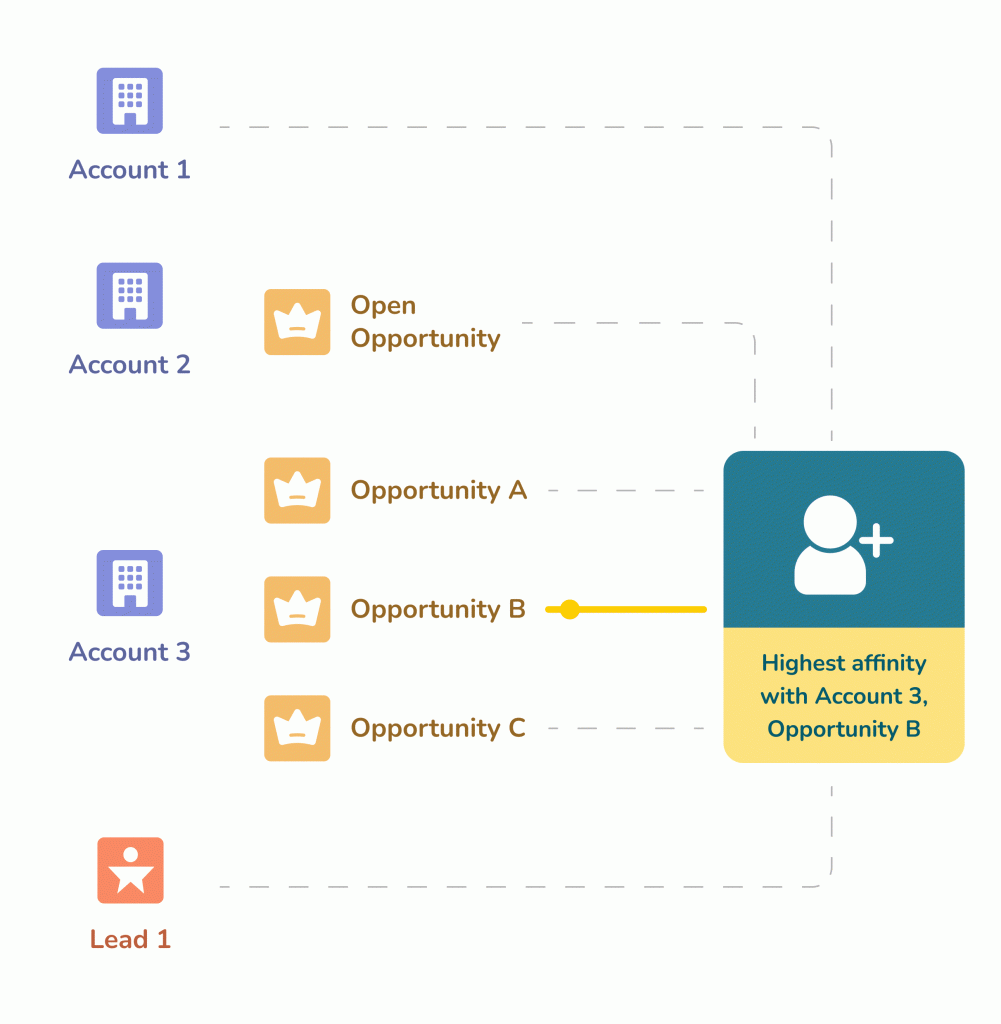
Opportunity Affinity AI weighs multiple inputs: the people in the From, To, and cc fields, the frequency of engagement with the people in To and cc, and the number of completed activities with everyone involved. A graph gets built connecting everyone associated with the current activity, alongside past activity across every possible Opportunity and Account those contacts touch. A confidence score gets assigned to contacts and activities based on that graph, which determines which Opportunity they actually sync into.
Managing Complex Combinations: A Unique Capability
Most sales tech that captures activity delivers on that specific promise. Capturing contacts alongside activity is rarer, and handling complex real-world combinations of the two is rarer still. Nektar handles scenarios most tools can’t:
Leads and Contacts: Capturing independent activity for both is table stakes. Nektar checks whether the email domain matches an existing Salesforce Account. If it matches, Nektar prioritizes syncing to the Account and its Contacts over the Lead record. If the Account exists but a contact doesn’t, Nektar creates that contact automatically. Say a rep gets an email from John (a contact at Acme, which exists on Salesforce), with Barney (an existing Lead) and Jane (who doesn’t exist on Salesforce at all) in CC. Nektar syncs the activity to the Acme Account and creates a new Contact for Jane, automatically. Any combination of leads and contacts, one lead and two new contacts, three leads and one existing contact, three leads and no contacts at all, gets handled the same way.
Rep in CC: In complex, multi-stakeholder evaluations, a prospect will often email a colleague directly and CC the sales rep. Nektar captures this too. If the colleague isn’t yet in Salesforce, Nektar creates the contact in the Account and associates it with the open Opportunity.
Closed opportunities: A common Customer Success scenario: a deal closes and the Opportunity closes with it, but contacts keep emailing the CSM afterward. Nektar keeps capturing that activity, syncing it at the Account level since the Opportunity itself is closed.
A mix of open and closed opportunities: If an outgoing email has the rep in From, a contact from an open Opportunity in To, and a contact from a closed Opportunity in CC, the activity syncs to the open Opportunity, since that’s the deal actually affecting the pipeline.
Activity between a prospect and a rep’s colleague: If a rep’s colleague emails the prospect directly without the rep on the thread, that activity still syncs at the Account level of the rep’s open Opportunity. If the rep is CC’d instead, it syncs directly to the Opportunity.
Activity to a non-sales contact at the seller’s own company, with the rep in CC, also gets captured.
Activity involving both Salesforce and non-Salesforce users gets captured on both sides.
Contacts and activity across multiple child domains under one parent domain get captured and correctly associated.
2. Sync Into Standard Objects for Better Reportability
A simple but meaningful differentiator: Nektar syncs contacts, emails, and meetings into standard Salesforce objects, not a proprietary data structure sitting alongside your CRM. That matters directly for any operations professional who has to build reliable reports on top of this data. Custom objects are supported too, but standard-object sync is the default, precisely because it’s what makes the data actually usable by the reporting your team already runs.
3. Time Travel: Retroactive Context, Not Just Ongoing Capture
The mark of a strong seller is that they’re always prospecting, which means engaging contacts long before those contacts exist anywhere in Salesforce. Eventually, after weeks or months of that groundwork, an opportunity lands and an Account gets created. This is where Time Travel does its work.
Nektar senses the new Account through domain matching, connects it to the contacts and activity already associated with that domain, and immediately pulls in the historical emails and meetings, however far back they go, attaching them to the newly created Opportunity.
Consider a more complicated version: a rep spends months prospecting several people at a target company, multithreading the account carefully, but never manages to create an opportunity before leaving the company. Some time later, a different rep is coincidentally assigned that same account, starts prospecting fresh, unknowingly re-engaging some of the same contacts the original rep had already built rapport with, and eventually lands the deal. The moment they create the Account in Salesforce, Nektar scans every seller’s inbox and calendar for anyone matching that domain, surfaces the contacts and activity history from the original rep’s tenure, however long ago it happened, and attaches all of it to the new Opportunity. The new rep inherits real context instantly, without ever having to ask around or dig through an old inbox that may not even still exist.
4. Transforming Salesforce Into a Self-Healing CRM
If a CRM is the central nervous system of a company, data is its connective tissue, and connective tissue that can self-heal is a genuine advantage. Self-healing is Nektar’s ability, within Data Foundation, to correct and update its own prior actions as new information arrives. When something changes, a meeting gets rescheduled, a participant gets added or removed, Nektar updates the existing Salesforce record and applies the same logic to future activity going forward. Manual changes made directly by a Salesforce user always take priority over Nektar’s own automated actions.
A concrete example: an Account named Acme has two Opportunities, Acme NA and Acme APAC. A rep on Acme NA notices two contacts (Opportunity Contact Roles) were mistakenly synced to Acme APAC instead, and manually moves them over. Nektar detects the change, automatically moves every activity already associated with those two contacts from Acme APAC to Acme NA, and learns from the correction, so all future activity involving those same two contacts syncs correctly to Acme NA going forward without anyone repeating the fix.
5. Filtered Contact Automation
Contact capture and lifecycle management still has real novelty in this category, even though activity capture alone is now table stakes. When Nektar discovers a new contact, it runs a domain match against existing Salesforce Accounts. If a match exists, Nektar creates the contact in that Account automatically, and if the Account has an open Opportunity, associates the contact as an Opportunity Contact Role.
Nektar can also extract job titles and phone numbers directly from email signatures, which feeds a further capability: dynamic buying-committee role tagging. In sales, the buying committee role matters more than the job title alone, though the two are related, and Nektar applies built-in heuristics (configurable by a Nektar admin) to map titles to buying roles automatically. Job titles can also be populated via a third-party enrichment tool if you prefer, while Nektar handles the buying-committee mapping on top of it.
Contact automation leans heavily on Opportunity Affinity AI, described above, and one more safeguard rounds it out: a denylist filter that excludes specific domains from ever syncing as contacts in the first place.
6. Zero Adoption Across the Funnel
This is the single most common reason customers choose Nektar. Nobody, not the sales leadership team, not the individual rep, not the manager, has to lift a finger. Contacts, emails, and activity flow through the normal channels a rep already uses, and Nektar captures, syncs, and sorts all of it into the correct Accounts and Opportunities automatically, both historically and on an ongoing basis.
Why This Matters More Now Than When This Was Written
Everything above was originally framed around saving reps and RevOps teams manual effort, and that’s still true. What’s changed is what this same automatically-captured data increasingly feeds. A growing share of CRM data now gets read and acted on directly by AI agents, prioritizing an account, flagging deal risk, updating a forecast category, rather than a person reviewing it first. The scenarios described above (a stalled deal correctly attributed, a contact correctly matched to the right Opportunity, a historical relationship surfaced the moment it becomes relevant again) used to just save a rep or a RevOps analyst time. Increasingly, they’re also what determines whether an AI agent acting on that same record is working from an accurate picture or a badly matched one.
Frequently Asked Questions
Q. What is Opportunity Affinity AI?
Nektar’s proprietary machine learning model for matching captured contacts and activity to the correct Salesforce Opportunity. It weighs sender, recipient, and CC relationships, engagement frequency, and completed activity history, building a confidence-scored graph that determines where each piece of data actually belongs.
Q. What is Time Travel in Nektar?
A capability that retroactively surfaces historical contact and activity data the moment a new Account or Opportunity is created in Salesforce, even if that history spans months or years and involves a rep who’s no longer at the company. It gives a new rep instant context instead of a blank record.
Q. What does self-healing mean for CRM data?
It means Nektar updates its own previously synced records as new information arrives, a rescheduled meeting, a manually corrected contact-to-opportunity assignment, and applies the same correction to future activity automatically, rather than requiring the same fix to be made repeatedly by hand.
Q. Does this require any change in rep behavior?
No. Capture, matching, and correction all happen automatically from normal email, calendar, and meeting activity a rep is already generating. That’s the specific design goal, zero adoption required from sales leadership, managers, or individual reps.
See CRM Data Hygiene on Autopilot
If CRM data hygiene is on your radar this year, talk to our team to see how Nektar’s Data Foundation can support your CRM data hygiene goals, no rep adoption required.
Enjoyed our content? Follow Nektar on LinkedIn