
TRUST & SECURITY
Security built for the data your AI acts on.
From customer conversations to your CRM, Nektar protects your data with audited security controls and secure OAuth access.

Trusted by teams that take security seriously.







Headless by Design. Secure by Default.
You define what's captured
Choose which users, inboxes, and calendars Nektar connects to. Set exclusion rules for internal, HR, or legal threads and block emails & events by address, domain, or keywords in the subject or body.

You define what's written
Mask subject lines and email bodies to protect sensitive information, and filter by role, engagement, and seniority. We set up your rules and applies them company-wide before writing to CRM.
Certifications
Trust Starts with Proof.
Review the independent assessments behind Nektar’s security.
Request our SOC 2 report, penetration test summary, and security policies through the Trust Center under NDA.
SOC 2 Type II
Independently audited to verify that our security controls work consistently over time.
ISO 27001
Nektar's information security management system, audited against the international standard.
GDPR
Personal data processed under GDPR requirements, with a Data Processing Agreement available to customers.
CASA Tier 2
Google's Cloud Application Security Assessment, validated by an authorized lab. Required for restricted Gmail API access.
AI & Data Use
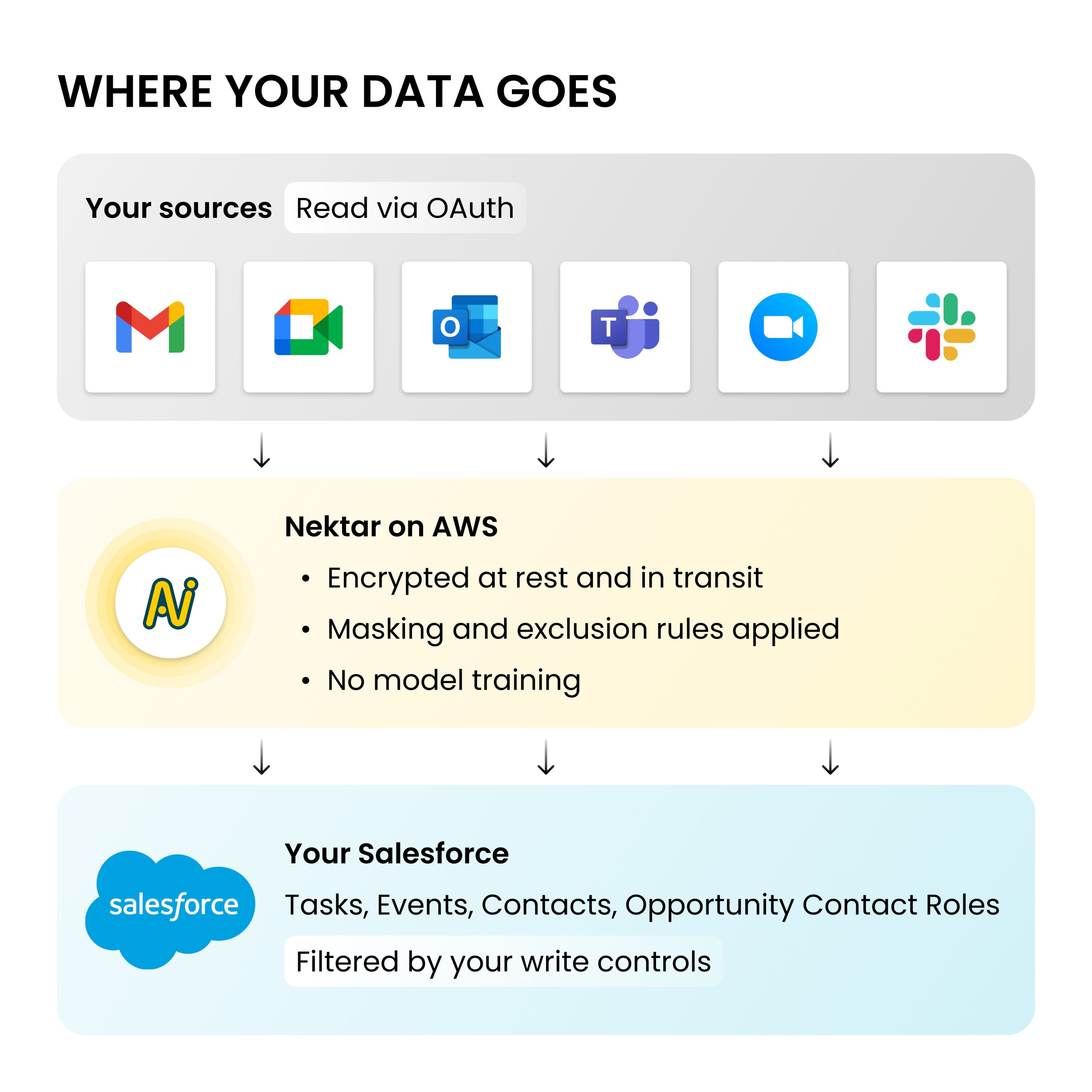
Your data doesn’t train our models.
- No model training on customer data
- Records written to standard Salesforce objects you own
- Least-privilege access to customer data to Nektar team
- All customer data purged within 30 days of contract termination
Infrastructure & Operations
How we Keep your Data safe, everyday.
Encryption
All data encrypted at rest and in transit. Every connection runs over SSL.
Hosting
Nektar runs on AWS, whose data centers hold their own SOC 2 and ISO 27001 certifications. AI processing for DAISY runs on Azure.
Access & SSO
Sign in with Salesforce SSO. Nektar staff have no access to your data by default. Temporary access for troubleshoot needs your approval.
Audit logs
Logs of data access and processing, available to admins on request and kept for at least 12 months.
Backups
Critical data is backed up regularly, and backup restoration is tested periodically.
Incident response
Affected customers are notified within 72 hours and a written summary will be shared within 7 business days.
Penetration testing
An external firm tests the platform every year. Summary available under NDA.
People
Background checks for every new hire. Security training several times a year.
FAQs
Questions procurement asks first.
What data does Nektar collect?
Only customer-facing business communication. Block rules drop personal, internal, HR, or legal emails before anything is processed or stored. You decide which inboxes, calendars, and Salesforce fields Nektar can access, and you can revoke that access at any time.
Do you use customer data to train AI models?
No. Nektar doesn’t train its own models on customer data, and the third-party models behind DAISY run on Microsoft Azure, which doesn’t use customer data for training.
Do reps need to install anything?
No. Nektar connects through admin-level OAuth. There's no browser plugin or desktop app on rep devices.
Does Nektar support single sign-on?
Yes. Users sign in to Nektar through Salesforce SSO, so there's no separate password to manage.
What happens to our data when we offboard?
Customer data is purged from Nektar systems within 30 days after contract termination. Records already written to your Salesforce stay yours.
What Microsoft 365 permissions does Nektar need?
Read-only ones: Mail.Read, Calendars.Read, User.Read, and offline_access for background processing. No write permissions, and your IT admin can audit or revoke the app anytime.
Can we pilot with a small group first?
Yes. Your IT admin can scope Nektar to one security group, such as a team of BDRs. Privacy settings carry over at full rollout, with no re-integration.
How do I report a security concern?
Email support@nektar.ai. Our security team reviews every report.
Bring your security questionnaire.
Policies, the SOC 2 report, pentest summary, and DPA are ready
in the Trust Center. For more details, reach out to our team.