



Building a Dynamic GTM Tech Stack
A conversation with Jamie Edwards, Former Head of GTM Operations & Tools at Gusto.
Executive summary
This blog distills Jamie Edwards’ playbook for building a go-to-market stack that delivers measurable impact. You will learn how to organize sales, marketing, and customer success operations under a single RevOps structure, evaluate software by fit to process rather than hype, and design systems that seasoned enterprise sellers will actually use. Jamie explains what belongs in the CRM versus the data warehouse, how to tag buying roles for cleaner handoffs, and why perfect attribution remains unsolved but manageable with clear context. A Gusto routing case illustrates time returned to ops as valid ROI. Practical takeaways include a vendor scorecard, adoption guardrails, a write-back policy, an AI use-case matrix with human checkpoints, and a 90-day rollout plan that moves from strategy baseline to AI pilots.
The Big Idea
A durable GTM stack starts with a clear operating model, not with a shopping list. Integrate sales, marketing, and customer success operations under one roof, select tools to amplify what already works, design for frontline adoption, and centralize data with context so AI can enhance rather than replace human judgment.
“Start with a strategy that would still work if all the tools went dark. Then add software to amplify what already works.”
Why RevOps is a Structure, Not a Label
Jamie pushes back on the casual use of the term RevOps as a job title applied to everyone. In his view, only a handful of leaders truly run revenue operations end to end. Under them sit specific functions: sales operations, marketing operations, and CS operations. When these teams sit together, tool decisions get better, data flows improve, and handoffs tighten.
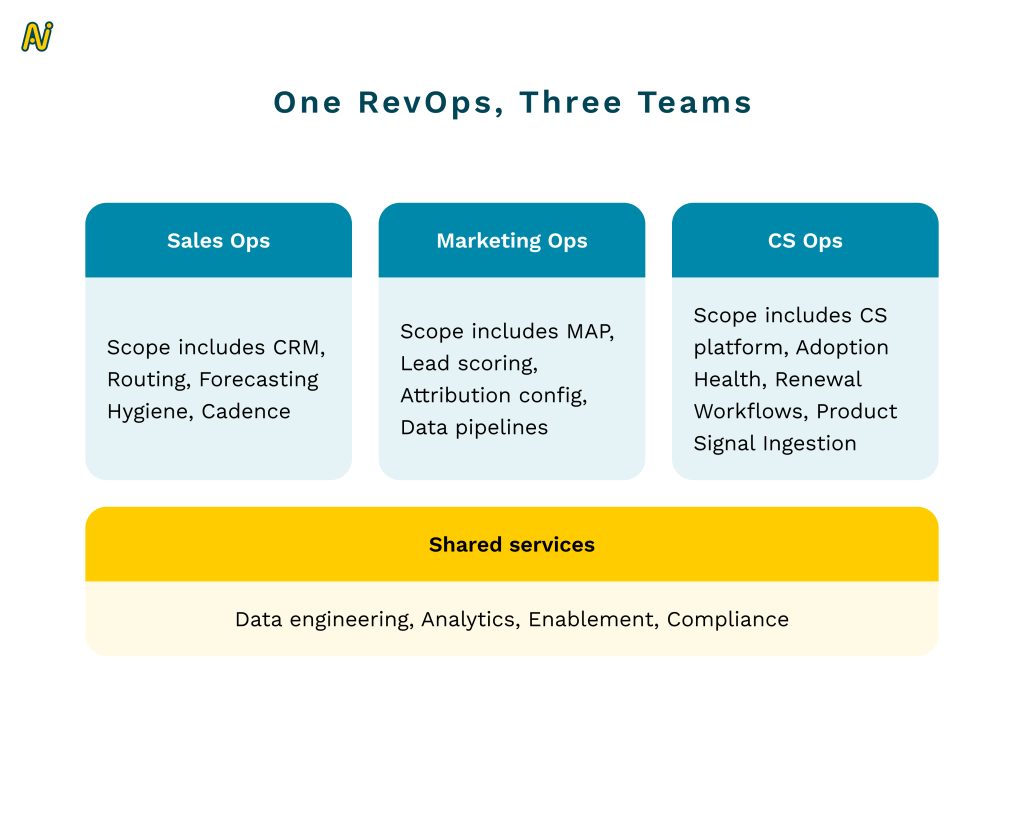
What this looks like in practice:
Marketing ops inside RevOps, not inside brand or demand teams
CS ops aligned with sales ops, since account management and customer success motions mirror each other
Shared system ownership and shared technical roadmap across the funnel
Tool Evaluation: Popular Is Not a Strategy
Jamie estimates only marginal capability differences among top tools within a category. The point is not to chase the flashiest features. The point is to choose the tool that strengthens your motion without breaking your ecosystem.
“There is maybe a one to two percent difference among the best tools. Buy the fit for your motion, not the sizzle.”
A checklist for tool decisions:
Start with your non-negotiables: which processes are proven and will not change
Map the work, not the logos: define the seller or CSM job to be done step by step
Score for integration first: how cleanly it writes to the CRM and to your warehouse
Price the ops time: if a tool returns hours to ops and analytics, count that as ROI
Decide the data home: CRM versus warehouse, avoid muddy write-backs
Run a kill-switch test: if the tool disappeared, would the process still stand
Creating a GTM Tech Stack From Scratch
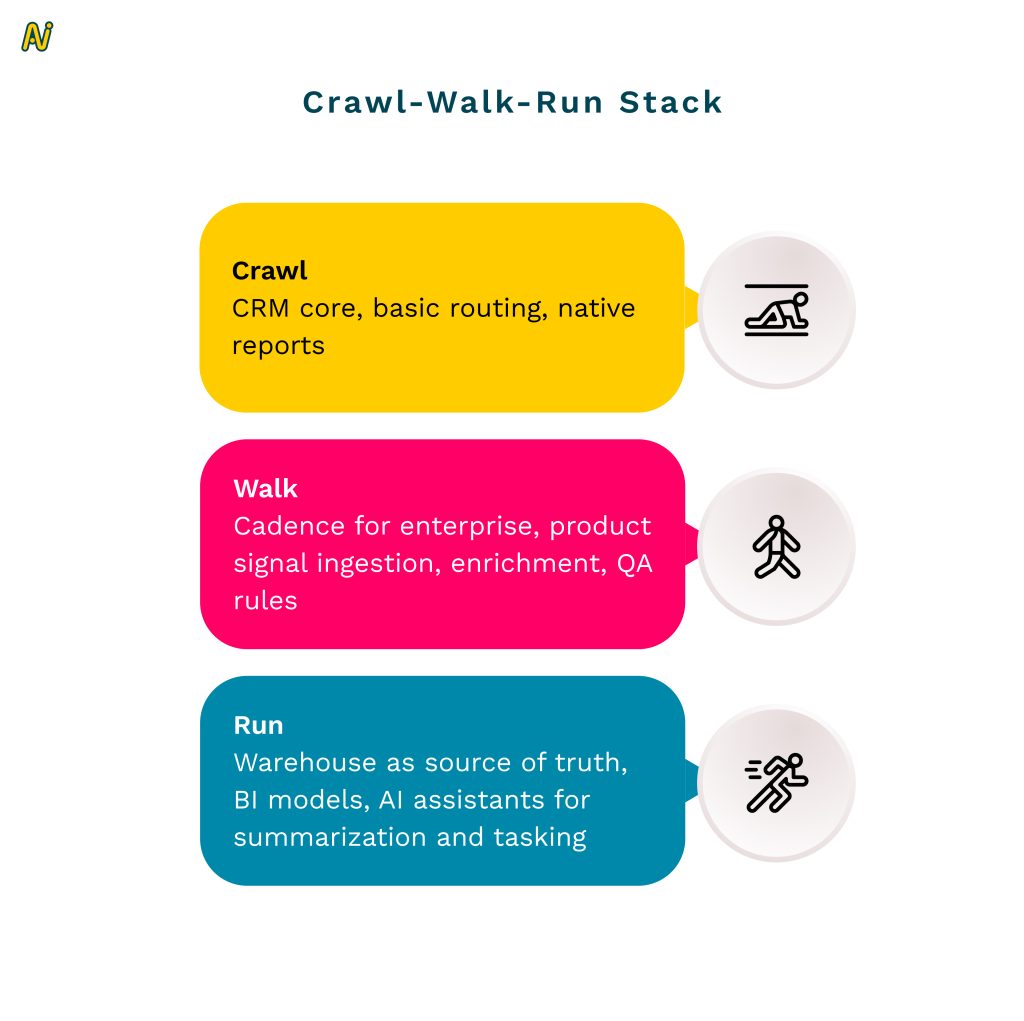
Jamie would anchor on a strong CRM, then add selectively.
CRM as the operational hub
The place sellers organize their day, leaders inspect pipeline and activity, and ops runs hygiene and routing. Do not name-chase. Pick what your team can maintain.Cadence management depends on segment
High velocity teams can often keep it simple in the CRM
Enterprise motions benefit from cadence tools for multi-threaded, multi-meeting pursuits
Delay heavy BI until the data merits it
Start with CRM reporting. Add BI when cross-system analysis becomes essential.
Adoption is a Product Problem
Veteran enterprise sellers resist rigid sequences that ignore account nuance. Edwards’ advice is to treat sellers like artists and give them the right canvas with sensible guardrails.
“Let the artist be an artist. Provide the canvas and paint, then set guardrails.”
Framework: Guardrails over Handcuffs
Standardize: global steps, minimum activity baselines, shared libraries
Personalize: allow custom sequences for named accounts, adjustable spacing, manual steps
Instrument: capture step outcomes, replies, meetings set, conversion by step and persona
Coach: use CI notes and call outcomes to tune personal cadences rather than force one pattern
Checklist: Designing for Adoption
Give tenured reps a custom sequence budget per quarter
Add skip and pause controls tied to account context
Track usage and results, then publish a quarterly “best of” library
Connect sequences to calendar tasks and pipeline stages so reps do not tab-hop
Avoid compliance traps that punish reasonable deviation
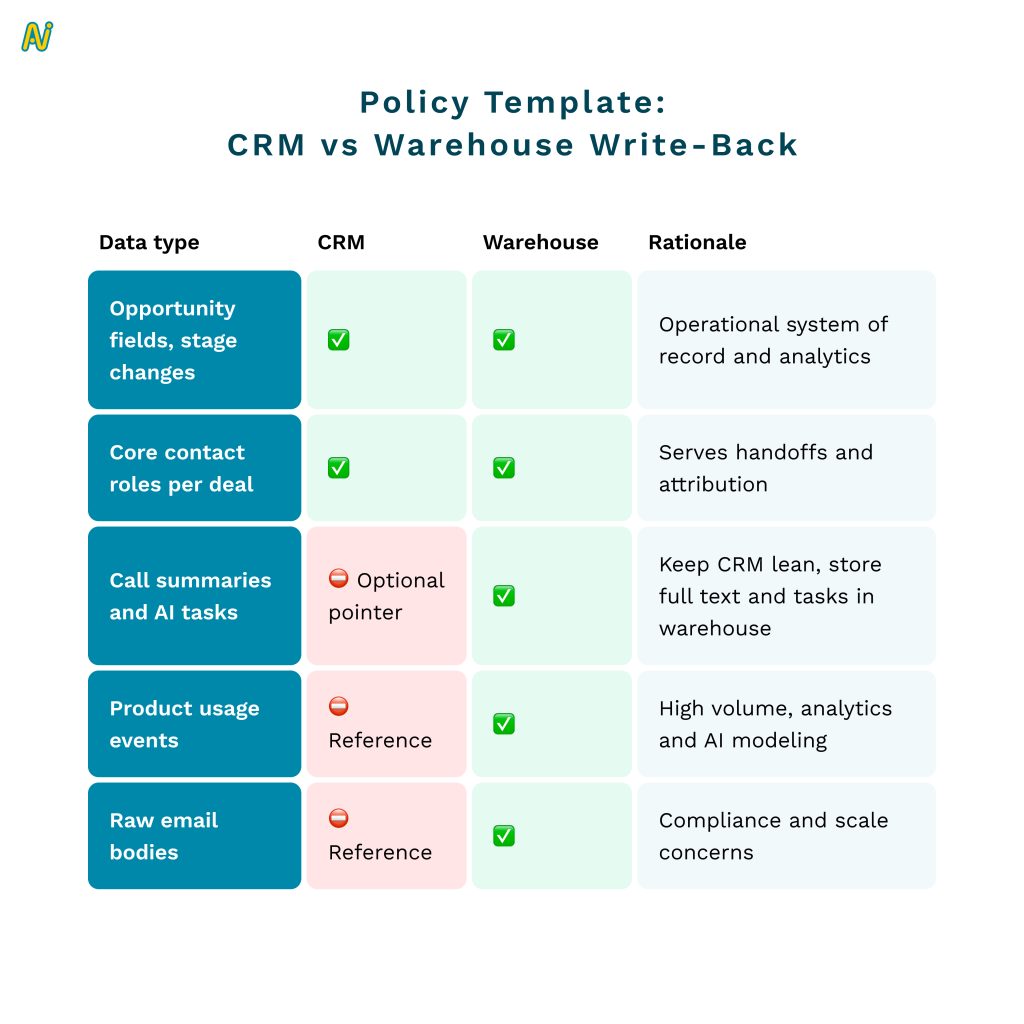
Data Strategy: What Belongs in the CRM, What Belongs in the Warehouse
Jamie cautions against dumping everything into the CRM. Storage and performance costs are real, and some AI use cases require a cleaner warehouse layer.
Attribution and the “Billion Dollar” Problem
Perfect attribution across MAP, ABM, cadence tools, CI, CS platforms, and CRM remains elusive. Jamie’s guidance is to be explicit about what you credit, be consistent, and document the context behind spikes and dips that models miss.
Attribution Model Selector:
Use last-touch for campaign optimization and in-period lift
Use position-based for budget allocation across early nurture and late stage influence
Use multi-touch custom for executive reporting where sales assists and partner referrals matter
Always add a context note in the deck that explains macro events or GTM shifts
Case Study: Dynamic Lead Routing That Paid for Itself
Gusto faced complex routing logic for small businesses, with many edge cases and time-boxed SLAs. Manual bucketing by ops burned hours and slowed responses. A dynamic routing tool reclaimed that time.
“Freeing hours from sales and marketing ops is a valid ROI. Those teams are force multipliers.”
ROI Calculator Template: Dynamic Routing
Inputs
Number of inbound leads per week
Current manual triage time per lead in minutes
Ops hourly fully loaded cost
SLA breach rate, pre and post
Outputs
Hours returned to ops per week
Cost saved per quarter
Lift in SLA attainment and first-touch speed
Expected impact on conversion to meeting
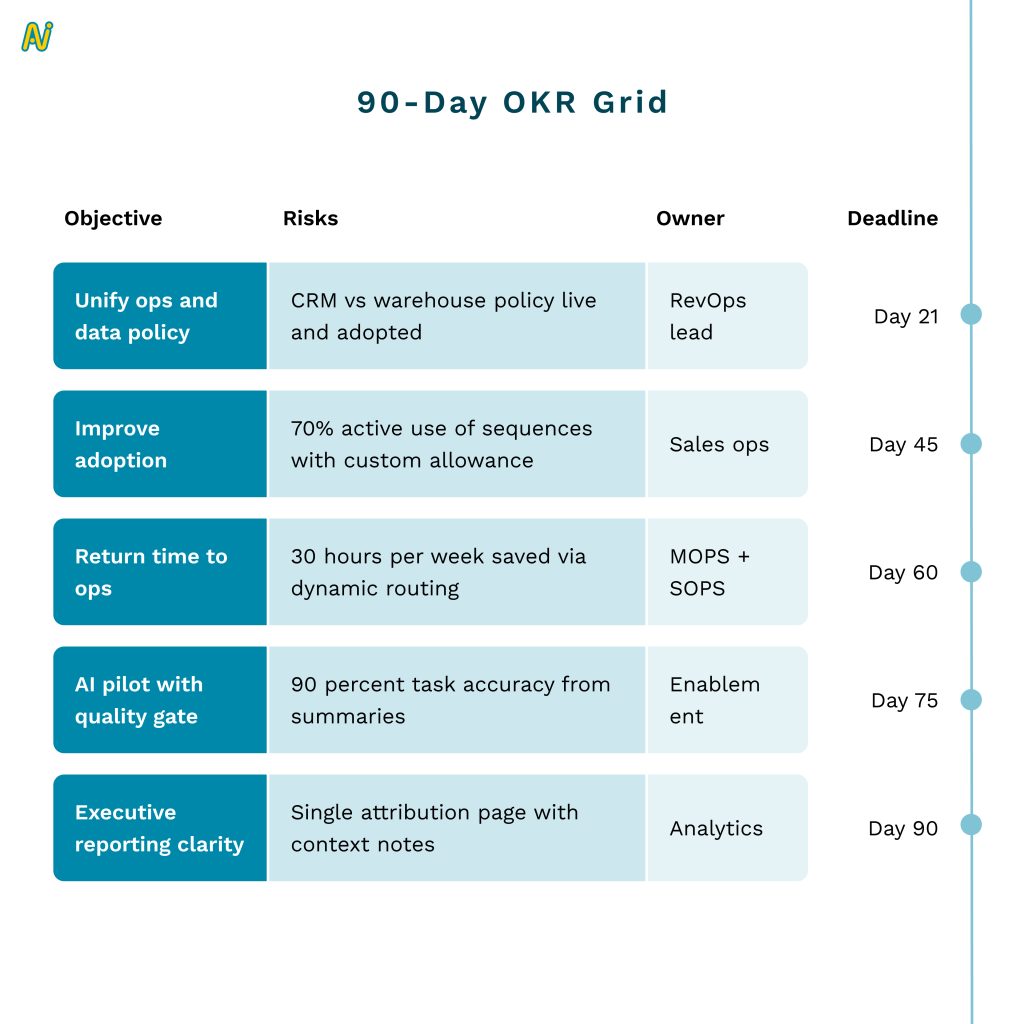
The First 90 Days: A Practical Plan
Week 1 to 3: Strategy and System Baseline
Map current motions, identify three non-negotiable processes
Inventory tools, owners, contracts, write-backs
Publish a “source of truth” policy for CRM and warehouse
Week 4 to 6: Adoption and Data Hygiene
Implement role tagging and contact hierarchy on all open opportunities
Launch guardrails for sequences, enable custom sequences for named accounts
Turn on basic routing SLAs with alerts
Week 7 to 9: Time-Return Projects and AI Pilots
Replace manual lead bucketing with dynamic routing, track hours returned
Pilot AI call summaries and task creation for two teams
Prepare a BI backlog, keep core reporting inside CRM until data justifies migration

Conclusion
The throughline in Jamie Edwards’ playbook is simple: technology should amplify a sound go-to-market strategy, not substitute for one. Unify sales, marketing, and CS operations under one accountable structure. Select tools that strengthen your specific motion. Keep the CRM lean and operational, let the warehouse do the heavy lifting, and capture role context so handoffs do not fray. Treat adoption like product design with clear guardrails and room for expert judgment. Use AI to remove repetitive work and speed decisions, then add the human context models cannot see.
If you do only five things after reading this, make them these:
Publish a CRM vs warehouse write-back policy.
Enforce buying-role tagging on every opportunity.
Replace manual triage with dynamic routing and track hours returned.
Give tenured reps limited custom sequences with usage and outcome reporting.
Pilot AI for summaries and task creation with explicit human review.
Stacks that win are almost invisible. They make the right thing easy for sellers, precise for operators, and trustworthy for leaders. Build around your motion, measure what matters, and let the system disappear into the work.
“AI should enhance how your teams work. Strategy and context still win. Build the stack that amplifies both.”
Want to hear more stories from revenue leaders? Subscribe to The Revenue Lounge podcast to never miss an episode!
More Resources

How to Strategically Engage and Conquer Buying committees
Delve into the complexities of engaging buying groups and unveiling strategic approaches to conquer the challenges that arise. In Sales, the key to accelerating deals lies in understanding the nuances of buying group dynamics.

5 Steps to Navigate Buying Groups in 2025: A RevOps Guide
5 Steps to Navigate Buying Groups in 2025: A RevOps Guide RevOps 10 min In today’s business environment, B2B buying is never just one person. According to Forrester Research, more than half of global business buyers purchase in complex buying scenarios that include more people, more departments, and generally higher price points. And this buying group can be made up of 7 to 20 people! Unlocking the power of buying groups is a crucial aspect of the B2B landscape. This blog is a synopsis of our conversation with revenue operations leader, Nandini Karkare. She is currently the SVP of RevOps at Zywave. Nandini suggests strategic steps to navigate through the realms of Revenue Operations and helps uncover the strategies, insights, and best practices that constitute a comprehensive guide to mastering the dynamics of buying groups. Read on to get actionable tips on how you can navigate buying groups in 2025 (and beyond). And implement the learnings to create a winning GTM motion. Here are the 5 steps Nandini recommends: 1. Decode Your Buying Groups The buying groups typically consist of members from departments and they all contribute different aspects. It is critical to understand the scope of decision-making including the people who play the most significant roles in making the call. Gartner’s report on B2B Buying highlights that 77% of B2B purchases involve a buying group of four or more people. PS: The key stakeholder can turn out someone altogether different from who you had building a relationship with all along. a. Capturing Buying Group Members Effective buying group management means considering not just decision-makers but influential stakeholders across departments. Misidentifying key players or focusing solely on the main contact risks derailing the sale. (i) How can you map the entire buying group efficiently? Leverage internal and external data to identify the key players Segment the Group by Role and Influence (ii) Not everyone in the buying group holds equal power or influence. Segment them into categories: Decision-makers (who give the final heads-up) Influencers (who sway the decision) Users (who use the product and provide feedback) Budget owners b. The Role Transition Within a Buying Group Moving the focus from a buying group to a renewal or expansion committee includes knowing precisely who remains in the relationship, as well as who becomes more active as an account grows. (i) New roles may emerge in a Buying Group Technical or operational leaders may become more influential post sale, since they are now using the product. (ii) The focus shifts from buying to renewal The interaction should be more about the return on investment (ROI) of the product placed on the market, ongoing value delivery, and ongoing needs. (iii) Alignment between the buying groups and renewal committee Leveraging the same enthusiasm and relationships generated at the first-buying stage helps in anchoring the transitions and preventing any drop-offs in engagement. Related Resource: Navigate Enterprise Buying Committees: Strategies for Driving Alignment c. Understand the Personal and Collective Priorities of a Buying Group As per McKinsey & Company, B2B buying decisions increasingly require engagement across departments, with 60% of purchasing committees including members from outside traditional procurement, like IT and HR. (i)Alignment Between C-Suite and Technical Teams Decisions aren’t Made in a Vacuum Collaboration between C-suite and technical teams ensures a holistic approach to solving customer problems, creating stronger, more sustainable relationships Their cross departmental collaboration can help with: (ii) Alignment on Strategic Goals C suite executives need technical assistance to translate their strategic vision to reality that also aligns with company-wide objectives. (iii) Technical Validation These insights guide the C-suite in making informed decisions that fit technical infrastructure and future-proofing. (iv) Cross-functional Communication Bridging the gap between these two groups involves continuous, open communication, ensuring that technical evaluations don’t delay business goals but instead support them cohesively. iii. Understand the Product Take product demos, listen to sales calls, and use tools that show how the product is sold. This helps in understanding the customer needs better. iv. Dive into Your CRM Understand your CRM (whether Salesforce or HubSpot) to assess how the data is organized. This is to check whether it’s easy to use, and identify immediate improvements. The CRM should be the central source of truth, with other tools supporting it. The data should be unified with easier adoption for the teams. v. Build Trust Internally Establish trust within your teams by listening carefully, asking questions about how RevOps can help, and addressing quick fixes to show you’re there to help. Having this trust shows them that you’re here to support their success. Quick wins, such as small fixes that make people’s jobs easier, helps in establishing credibility early. 2. Establish Clear KPIs i. Understanding Team KPIs It is important to ask you stakeholders about the KPIs that matter to understand their goals and what their expectations are. ii. Aligning KPIs Across Teams Different departments oftentimes work in silos. RevOps should strive to align these departments and check if these KPIs match the overall business objectives. Gaps must be closed if their KPIs don’t align. iii. Setting RevOps KPIs As you approach the end of the first 30 days, start establishing RevOps-specific KPIs that match company goals, which may involve metrics like revenue increase, conversion rates, or improvements in overall efficiency. 3. Tech Stack Audit Deep dive into the existing tools that your company is using. Identify all redundancies, and find opportunities to streamline the entire tech stack. i. Map Out Tools Compile a list of all tools used by teams, noting their purpose and how they work with the CRM. ii. Evaluate Use and Cost Determine if tools are actively used or if there are duplicates. Look for cost-saving opportunities by consolidating tools when possible. https://www.youtube.com/watch?v=sVDJ9KI1tGw&t=869s Next 30 days – Alignment and Control The next 30 days marks a shift from discovery to alignment. The goals should be to create cohesion between departments (e.g., Sales, Marketing) and laying down effective controls. The improvements need to be implemented without overwhelming the teams. This phase combines
Everything You Need to Know About Sales Territory Mapping
Everything You Need to Know About Sales Territory Mapping RevOps 10 min Successful sales strategies play a key role in achieving business goals. But what drives these strategies from inception to execution, improving sales operations and on-ground performance? Sales territory mapping. Without the right sales territory map template, your sales team could face challenges, namely: Poor productivity Revenue mismatch or imbalance Subpar revenue performance Poor customer experience Leading to the loss of clients, and Waste of valuable resources So, how do you get sales territory mapping right to achieve business goals and grow your revenue? Let’s find out in this blog. Sales Territory Mapping: Setting On-Ground Sales in Motion Sales territory mapping defines and visualizes the area, sales amount, and revenue your sales team will target. It divides and categorizes customers based on specific characteristics within your ideal customer profile (ICP). A sales territory map template also helps you assign categories and customers to the salespersons best equipped to serve them. It lets you reach the right customers in the right areas with the right characteristics to achieve targets and improve growth. The task of aligning your sales plan with business goals in the most profitable way lies with sales managers. From the larger business perspective, sales territory mapping is part of location intelligence. Today, location intelligence helps segment customers and find more relevant target markets for revenue success. How Is Sales Territory Mapping Instrumental to Business Growth? A sales territory map template does more than act as a blueprint. Here are 6 more ways in which it contributes to growth. 1. Ties Back to Business Goals Sales territory mapping creates a blueprint for achieving your business goals. It clearly lays out sales targets and directs reps to the most profitable customers or verticals by strategically assigning territories. 2. Maintains Balance One of sales territory mapping’s primary objectives is to secure a balanced and fair distribution of work among sales teams. It moves and optimizes resources effectively to maximize revenue potential. 3. Increases Selling Time Reps can increase facetime with clients by cutting down time spent on planning. This is specifically made possible with sales territory mapping tools that decrease planning time from months to minutes. 4. Improves Win Rates Naturally, when reps spend more time selling, they can nurture clients better through the sales funnel. Moreover, each assignment is backed by data. This data offers more visibility into customers and prevents deals from slipping through the cracks. As a result, reps can improve customer experience and uncover new leads to increase win rates. 5. Boosts Morale A sales territory map template encourages intelligent planning, further improving sales productivity. Additionally, when reps can increase win rates, achieve their quota, and earn more, it boosts their morale. And if reps are happy, it means your attrition rates are lower. It’s not just that. A sales territory map template also highlights improvement areas useful for coaching. 6. Extracts Hidden Insights Sales territory mapping helps measure sales data by connecting the map to the CRM. Therefore, when multiple salespersons are involved in a deal, you can attribute the sale to the right person. Recognizing the benefits of sales territory mapping is the first step in setting up your own template. Step two is understanding its different types. Choosing From 5 Types of Sales Territory Mapping Conventionally, sales territories were based on locations. However, you can customize them today as per your customer, market, or even product needs. Let’s take a look at the 5 types below. 1. Geography Geographic sales territory mapping is the most commonly used and also the oldest. It classifies your market based on, you guessed it, geographical locations—cities, states, countries, and zip codes. For example, Sales Team A can serve Texas, while Sales Team B covers California. To get geographic mapping right, your sales team must have a regional, cultural, and linguistic understanding of the territory they’re allocated. It’s also important to ensure that the selected sales team is available when customers are active in the designated regions. 2. Product Product-based sales territory mapping can be used when you have multiple offerings. You can categorize and assign reps to specific products or technological offerings. This method is useful when certain reps have in-depth expertise on specific products. For example, Team A has expertise in CRM solutions and is assigned to this offering, while Team B caters to clients looking for Digital Advertising software. Assigning your reps to the right products will ensure they can sell to clients more convincingly. 3. Customer The third way to divide your sales territories is based on specific customer characteristics like demographics or roles. For instance, Sales Team A may sell to clients with a yearly revenue of $500,000. On the other hand, Sales Team B focuses on the higher margin clients with yearly revenue of $1 million and upwards. 4. Industry Industry-based sales territory mapping assigns reps to specific industries or verticals. It works best when your product caters to individuals or businesses from multiple industries. For example, Team A sells to the construction industry, while Team B covers the education sector. Similarly, Team A could be selling to the education industry overall, while Team B handles specific verticals–like universities or higher education–and Team C is responsible for schools. 5. Sales Channel An upcoming type of sales territory map template categorizes territories per the sales channels your reps or clients use. That’s because buyers now use ten or more channels, on average, as they move through the buying process. They use a combination of digital self-serve channels for certain activities and videos or in-person channels for others. Consider this example. Team A is responsible for selling via digital channels like social media, and Team B sells through offline channels such as cold calling. You may also get more granular by assigning reps with expertise in certain platforms to those mediums. For instance, Rep A sells via emails, and Rep B may use LinkedIn. Knowing the key types of sales territories is awesome. But figuring out the type of