



A RevOps Playbook on the GTM Power, Careers and Hiring Strategies
A conversation with Andy Mowat
Executive Summary
Andy Mowat has navigated the go-to-market journey from every angle—entrepreneur, operator at four tech unicorns (Box, Culture Amp, Carta), and now founder of Whispered. In this conversation, Andy shares hard-earned lessons on what separates strategic RevOps leaders from tactical executors, why the GTM tech stack is dying, how to take control of executive interviews, and why most people are dangerously cheap about investing in their careers.
This isn’t theory. It’s a playbook built from someone who’s been the “wrong person for the job” four times and figured out how to win anyway.
Readers will learn:
RevOps is evolving from an execution function into a strategic GTM decision engine.
The best RevOps leaders earn trust by forcing trade-offs, not by saying yes to everything.
Legacy GTM stacks are breaking. Data fluency and AI-ready systems are becoming mandatory.
GTM engineers are emerging under RevOps to automate execution and scale insight.
Most executive roles are never posted. Senior hiring happens through networks and backchannels.
Hiring favors builders who can get into the weeds, not just managers of managers.
Strong candidates take control of interviews and show how they think, not just what they’ve done.
Career leverage now comes from networks, reputation, and visible thinking, not applications.
From Accidental RevOps to GTM Architect: Andy's Career Arc
Andy did not plan to end up in revenue operations. He stumbled into it the way many of the best RevOps leaders do.
Early in his tech career, he joined Upwork.
There was no CRM. So he built one.
There was no outbound engine. So he figured out how to send a million emails.
There was no formal RevOps function. So he became it.
This pattern repeated.
At Box, post-IPO, he took over post-sales operations, then marketing ops. At Culture Amp, he helped scale revenue from roughly $5M to $150M. At Carta, he entered during another inflection point, surrounded by leaders who understood that GTM decisions compound quickly, for better or worse.
Across these roles, Andy learned something that most operators learn too late.
RevOps is not a service desk. It is the economic engine room.
The Real Difference between Tactical & Strategic RevOps
Most RevOps leaders think their job is to execute requests efficiently. Andy believes that is how RevOps loses credibility.
The inflection point in his thinking came at Box, when the company’s CCO told him “he’s not getting headcount unless the business gives it to him”.
Instead of asking for budget, Andy began forcing trade-offs.
He showed Sales, Support, and Customer Success how RevOps leverage could outperform incremental hiring. When leaders realized that one RevOps hire could unlock more growth than two frontline hires, budget appeared quickly.
Andy’s rule is simple.
If RevOps says yes to everything, it is not strategic.
If RevOps forces prioritization conversations with executives, it is.
“The wrong answer is ‘We got it.’
The right answer is ‘Here’s the priority order I see. If we disagree, let’s take it to the CRO.” — Andy Mowat
Where RevOps is Actually Headed
Andy does not believe today’s GTM stack survives the next five years.
He is tracking more than a dozen “CRM 2.0” challengers. His core criticism of legacy tools is structural, not cosmetic.
Current GTM systems have:
Clunky user experiences
Data models not designed for AI
Endless bolt-ons that fragment signal quality
The Non-Negotiable Skills a RevOps pro Must Have
Data literacy. Know what ETL and DBT actually do.
Tight partnership with product and data teams.
Embedded analytics and BI inside RevOps.
Automation ownership, not tool babysitting.
He also pushes back on the myth of the “GTM Engineer” as a shortcut.
There is no shortcut. But there is a new function emerging.
“GTM Engineers should live under RevOps.
Their job is to automate the business and innovate for the reps.” — Andy Mowat
What is Whispered?
Whispered did not start as a company. It started as a survival mechanism.
After a failed startup, Andy found himself asking a question many senior leaders never admit out loud.
“Will anyone Hire me again?”
At senior levels:
Roles are rarely posted.
Recruiters control access.
Company quality is opaque.
Networks go stale quietly.
“Your next role won’t be posted. It’ll be whispered.” — Andy Mowat
Whispered is designed for VP+ GTM leaders who are curious but cautious. It combines:
Career playbooks
Company backstory intelligence
Unposted role discovery
Network swarming across 300,000+ first-degree connections
A private community that trades signal, not hype
People join for roles. They stay for the network.
Strategies for Hiring Senior Executives
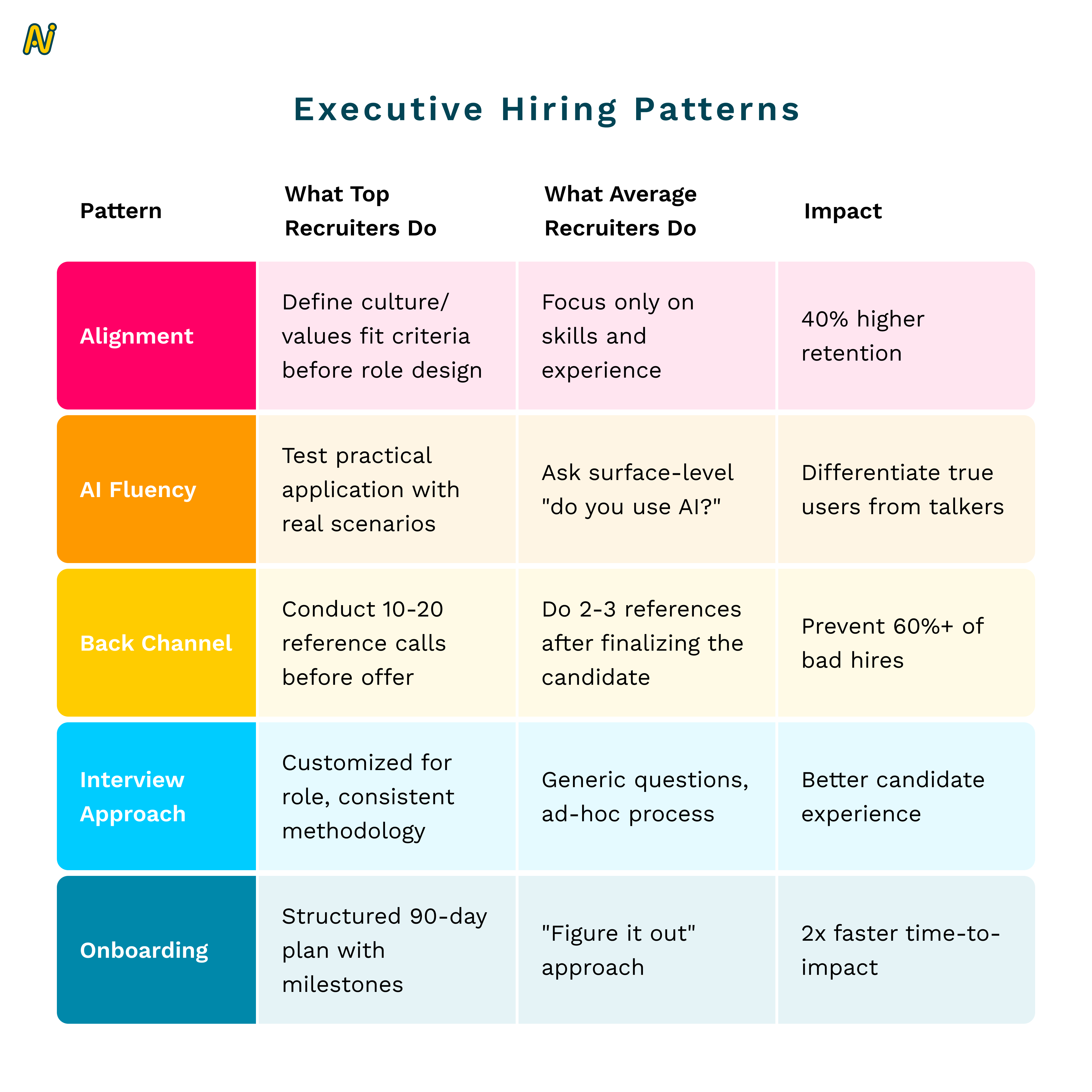
Through Whispered Hiring, Andy has interviewed dozens of CEOs, CROs, and CMOs about how they evaluate senior talent.
Several patterns repeat.
1. Back-Channels Are the Highest Signal
Everyone uses them. Everyone admits it.
The best advice he heard recently:
“Back-channel before you fall in love with a candidate.”
2. Builders Are in Demand
Even at senior levels, companies want leaders who can still get into the weeds.
AI has increased this expectation, not reduced it.
3. Rigid Thinkers Lose
Andy calls it anti-rigidism, not ageism. Leaders who cannot adapt get filtered out quickly.
4. Slope Matters, but Only with Pattern Recognition
High-growth companies love people who can outgrow their role. But leadership teams need both:
Builders with slope
Operators with scars
Out perform your next Interview call
Andy comments, treat your interview as a Sales call.
Andy’s favorite interview opener is disarming.
“I’m excited to meet you. What questions do you have?”
Then he watches.
Great candidates take control. Weak candidates wait to be prompted.
Lazy questions kill momentum. Deep questions reveal how someone thinks.
Interview Question Upgrade
Instead of:
“What’s your strategy?”
Ask:
“Here are three GTM constraints I see. Which one worries you most right now?”
The goal is not to impress. It is to create signal.
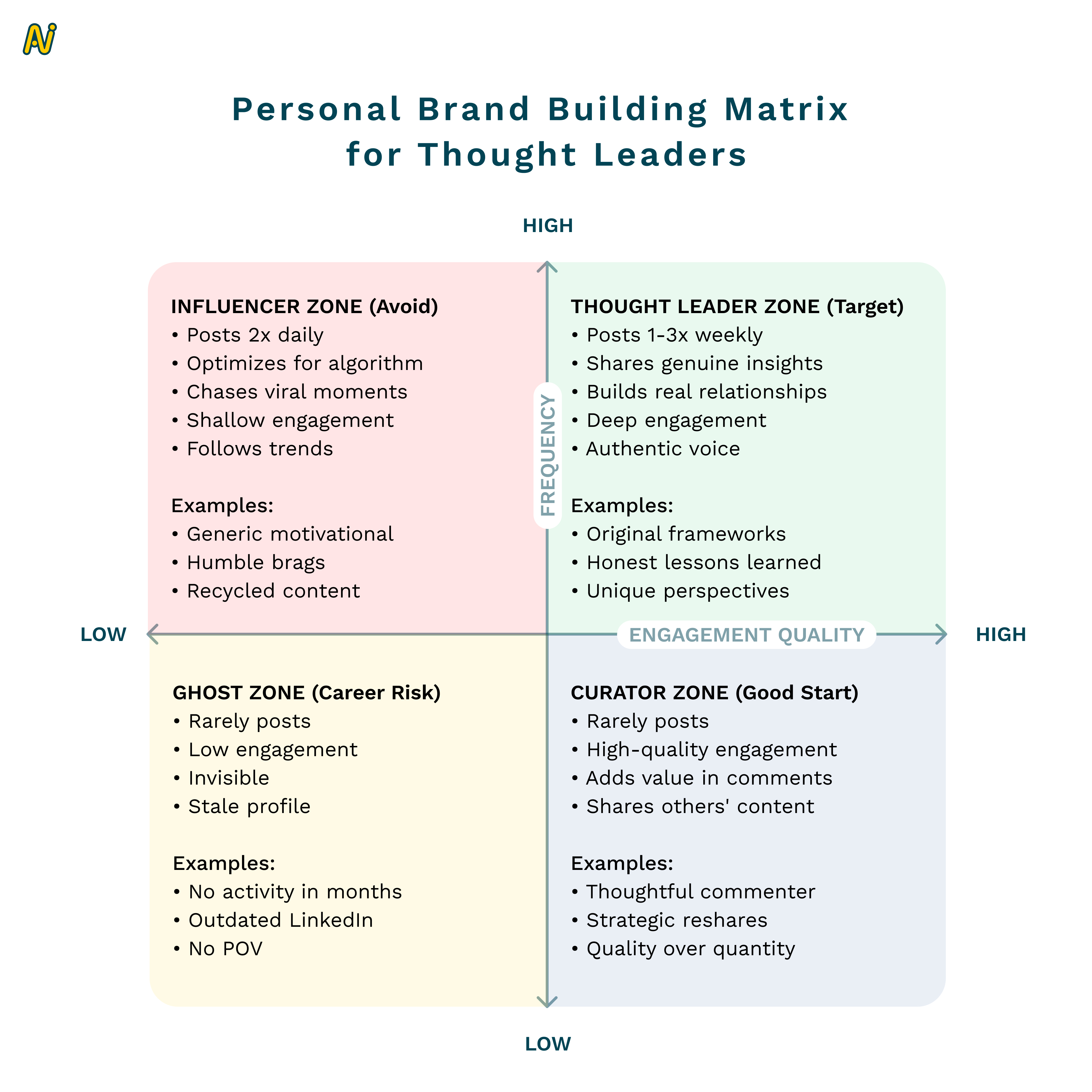
Personal Brand Without Becoming an Influencer
Andy draws a line between thought leadership and performance.
He writes because he cares and because writing clarifies thinking. It also compounds career surface area.
“People don’t ask me what I think. They ask me about an article I wrote.”
Checklist
LinkedIn That Actually Works
Clear narrative of who you are
Explicit value you bring
Consistent thinking, not chasing engagement
Real engagement in comments, not drive-by posting
If your profile confuses people, it is not neutral. It is actively hurting you.
What Makes a Great Director or VP
Andy does not hire for “coachability.” He hires for mentality.
Non-Coachable Traits
Pulls the business forward
Anticipates issues and brings solutions
Forces prioritization
Communicates in metrics
Manages up naturally
Earns unsolicited stakeholder praise
“I don’t have time to teach you how to think.”
Career Advice from Andy
His advice is simple.
Help people earlier. Write earlier. Stay connected to old colleagues. Networks decay quietly if you let them.
And sometimes, swallow your ego.
“Sometimes take the number two seat at a great company instead of the top seat at a bad one.”
Conclusion
Andy Mowat’s career is not impressive because of titles. It is impressive because of how deliberately he learned to navigate ambiguity.
RevOps leaders who want executive trust must force trade-offs.
Candidates who want senior roles must create signal, not wait for permission.
Careers do not progress linearly. They progress through relationships, judgment, and timing.
And the most important roles will never show up on LinkedIn.
They will be whispered!
Want to hear more stories from revenue leaders? Subscribe to The Revenue Lounge podcast to never miss an episode!
More Resources

How to Strategically Engage and Conquer Buying committees
Delve into the complexities of engaging buying groups and unveiling strategic approaches to conquer the challenges that arise. In Sales, the key to accelerating deals lies in understanding the nuances of buying group dynamics.
Top 15 Guided Selling Tools for 2025
Top 15 Guided Selling Tools for 2025 RevOps 10 min Imagine that you are planning to build a new house but are unsure where to start. You have a basic idea of what you want but are not an expert in home construction or design. In such a situation, you would need a skilled architect who understands your needs, preferences, and budget and then guides you through designing your dream home. The architect would help you make informed decisions about your new home’s design, materials, and features. Similarly, a guided selling tool uses customer data and sales expertise to help customers navigate the purchasing process and make informed decisions. It can provide personalized recommendations based on the customer’s needs and preferences, answer questions, and offer advice to help them choose the right product or service. What is Guided Selling? Guided selling is a strategy involving a structured approach to lead potential customers through the sales process. It is the process of analyzing current sales, historical sales, and customer data to help sales reps provide tailored product recommendations to customers and increase the likelihood of conversion. Let’s say you are shopping for a new laptop. You visit a website that offers guided selling, and you’re prompted to answer a series of questions. The questions might include things like: What will you primarily use the laptop for? Do you need a large screen or a lightweight design? How important is battery life to you? What is your budget? Based on your responses, the website would then recommend a few different laptops that meet your needs. It might provide detailed information about each laptop, such as the processor, RAM, and storage capacity, as well as customer reviews and ratings. The website might offer additional guidance, such as recommending accessories or providing information on warranties and support. Throughout the process, the focus is on helping you make an informed decision based on your unique needs and preferences. Guided selling can be particularly effective for complex or high-value products or services where customers may require more personalized guidance and support to make informed purchasing decisions. By providing a more consultative sales approach, guided selling also helps to establish long-term customer relationships. How Does Guided Selling Work in B2B SaaS In B2B SaaS, guided selling typically involves a sales representative or a customer success manager who guides the customer. The process usually begins with the customer expressing their needs and goals and the guide using that information to suggest relevant products or services. The guide may use various tools, such as a software demo, to help the customer understand the features and benefits of each option. In addition, guided selling often involves providing educational resources to the customer to help them better understand the product or service and how it can help them achieve their goals. This may include case studies, white papers, or other content that provides valuable insights into the benefits and use cases of the product. Let’s have a look at the guided selling process in detail: The Process of Guided Selling Tools The guided selling process is a customer-centric approach to sales that involves guiding potential customers through the buying process by providing personalized recommendations, advice, and support. The following are the general steps involved in a typical guided selling process: 1. Gathering customer information The first step of the process involves collecting data on the customer’s needs, preferences, budget, and any other relevant information that can help the sales process. 2. Identifying customer pain points In this stage, the sales team uses the information gathered in the previous stage to identify the customer’s pain points or areas of concern.This is typically done through a series of questions or a needs assessment. 3. Providing product recommendations Based on the customer information and pain points identified, the sales team provides recommendations on the products or services that best meet the customer’s needs. 4. Presenting solutions At this stage, the sales team presents the recommended products or services to the customer and explains how they address the customer’s pain points. The sales representative provides information about the recommended products or services, including their features, benefits, and pricing. 5. Handling objections If the customer has any objections or concerns, the sales team addresses them and provides additional information or alternative solutions as needed. 6. Closing the sale Once the customer is satisfied with the recommended product or service, the sales team closes the sale by facilitating the purchase process. 7. Follow-up and customer support After the sale is complete, the sales team provides follow-up support to ensure the customer is satisfied with their purchase and offers any additional assistance or support as needed. Examples of Guided Selling Tools in Businesses Here are some examples of techniques of guided selling tools: 1. Automate sales playbook To ensure consistent performance, sales playbooks should be automated. Guided selling relies on a solid foundation of methodologies, blueprints, and plays that facilitate the sales process. It’s important to choose a solution that simplifies the playbook for sellers, allowing them to follow the plan and consistently advance deals easily. 2. Identify specific needs In some situations, customers may need a clearer idea of what they are looking for when they visit your website. In such cases, a brief questionnaire can be used to determine and guide their specific requirements. For instance, if you run an online clothing store, you could ask customers questions about their preferred fit and fabric to steer them toward products that best match their preferences. This approach can increase the likelihood of a purchase by helping customers make informed decisions based on their needs. 3. Real-time response For a guided selling software to be effective, it needs to be adaptable and flexible, able to react to changing circumstances in real time. At a fundamental level, ensuring that sales representatives remain attentive to communication and other sales activities can reduce the time it takes to close deals and result in higher revenue velocity. In other cases,
A 30-60-90 Day Guide for First-Time Directors of Revenue Operations
A 30-60-90 Day Guide for First-Time Directors of Revenue Operations RevOps 10 min Starting a new job as a Director of Revenue Operations is an exciting opportunity to make a significant impact on a company’s revenue growth. To ensure success in this role, it’s essential to have a strategic plan that guides your actions during the crucial first three months. Here’s a 30-60-90 day plan that will help you strategically manage revenue operations and drive sustainable growth. We recently spoke to Hassan Irshad, Director of RevOps at FEVTutor. He shared his approach to this powerful framework, demonstrating how each phase (30, 60, and 90 days) builds strategically upon the last to deliver alignment, trust, and sustained improvement. By breaking down complex goals into achievable milestones, the 30-60-90 day approach empowers RevOps leaders to initiate meaningful change without overwhelming teams. For all the RevOps leaders, it’s a way to approach change with purpose, driving measurable impact and laying the groundwork for long-term success. The 30-60–90 day framework must be an indispensable tool and here is how you can implement progressive, sustainable growth strategies from day one. First 30 days for a Director of Revenue Operations The purpose should be to gather insights and understand the organization, especially the needs and challenges of different teams. 1. Goals for first 30 days: i. Meet Key Stakeholders Meet with cross departmental teams like Finance, HR, and Sales to understand their goals, challenges, and priorities. ii. Document Everything Create a “lay of the land” document summarizing findings on different team goals, challenges, and processes. iii. Understand the Product Take product demos, listen to sales calls, and use tools that show how the product is sold. This helps in understanding the customer needs better. iv. Dive into Your CRM Understand your CRM (whether Salesforce or HubSpot) to assess how the data is organized. This is to check whether it’s easy to use, and identify immediate improvements. The CRM should be the central source of truth, with other tools supporting it. The data should be unified with easier adoption for the teams. v. Build Trust Internally Establish trust within your teams by listening carefully, asking questions about how RevOps can help, and addressing quick fixes to show you’re there to help. Having this trust shows them that you’re here to support their success. Quick wins, such as small fixes that make people’s jobs easier, helps in establishing credibility early. 2. Establish Clear KPIs i. Understanding Team KPIs It is important to ask you stakeholders about the KPIs that matter to understand their goals and what their expectations are. ii. Aligning KPIs Across Teams Different departments oftentimes work in silos. RevOps should strive to align these departments and check if these KPIs match the overall business objectives. Gaps must be closed if their KPIs don’t align. iii. Setting RevOps KPIs As you approach the end of the first 30 days, start establishing RevOps-specific KPIs that match company goals, which may involve metrics like revenue increase, conversion rates, or improvements in overall efficiency. 3. Tech Stack Audit Deep dive into the existing tools that your company is using. Identify all redundancies, and find opportunities to streamline the entire tech stack. i. Map Out Tools Compile a list of all tools used by teams, noting their purpose and how they work with the CRM. ii. Evaluate Use and Cost Determine if tools are actively used or if there are duplicates. Look for cost-saving opportunities by consolidating tools when possible. https://www.youtube.com/watch?v=sVDJ9KI1tGw&t=869s Next 30 days – Alignment and Control The next 30 days marks a shift from discovery to alignment. The goals should be to create cohesion between departments (e.g., Sales, Marketing) and laying down effective controls. The improvements need to be implemented without overwhelming the teams. This phase combines further exploration with actionable improvements with the primary task being bringing the teams into sync. 1. Ways to bring your teams together i. Encouraging cross-team collaboration by addressing silos and ensuring all teams work toward shared quarterly or company-wide goals. ii. By creating alignment, you help teams see RevOps as a support system rather than an enforcer. This keeps communication channels open and creates buy-in. iii. Based on your findings, introduce controls wherever needed to improve workflow. Example: If close dates aren’t being recorded properly, this could skew reports. Meet with sales, identify the root cause (e.g., manual data entry that is taking too much of a reps’ time), and provide solutions or tools to make their tasks easier. Ensure that controls are practical and developed with the trust built in the first 30 days. Foster internal consensus within teams so that these improvements are adopted seamlessly. 2. Navigate Organizational Politics (i) Barrier Removal Larger organizations may have internal politics or ingrained processes that resist change. Find an internal “sponsor” who trusts and supports RevOps initiatives and can authorize actions to navigate any resistance. (ii) Trust and Consistency As you implement changes, make sure your efforts consistently demonstrate how RevOps can make work easier and more efficient for everyone. 3. Evolving the Tech Stack (i) Assessing Tech Needs If tools aren’t fully integrated (e.g., a tool not writing data back to the CRM), identify their gaps and consider evolving the tech stack. (ii) Holistic View Use insights from the discovery and alignment phases to start envisioning necessary tech improvements that align with company goals. Beginning of the 90-Day Phase: Vision and Execution This phase, described as “Vision and Execution,” involves shaping and executing a strategy based on insights gathered from the discovery and alignment phases. a. Roadmap Creation Create a roadmap covering the next two quarters, focusing on long-term, high-impact changes that align with business goals. Use learnings based on stakeholder needs, organizational goals, and the findings from the first 60 days i. Set Priorities Collaborate with end users (Sales, Marketing, Customer Success) to understand their pressing needs and align the roadmap with these needs. ii. Strategic Execution Prioritize initiatives that will have immediate revenue impact or