
Salesforce Lead vs. Opportunity: Explore the Difference
- Salesforce
- 9 min
- Updated: August 3, 2026
Salesforce leads and Salesforce opportunities are usually the first two terms that trip people up when they start working in the platform. Understanding the distinction matters for more than vocabulary: getting the lead-to-opportunity handoff right is what keeps a pipeline, and eventually a forecast, actually reflecting reality.
This guide covers what each object represents, the practical differences between them, and when (and how) to convert a lead into an opportunity.
Get our latest insights into your inbox

What Is a Salesforce Lead?
A lead is the earliest stage in the customer acquisition process in Salesforce: a potential customer or business that’s shown initial interest, but whose interest hasn’t yet turned into a concrete sales opportunity. Leads are usually people or organizations who’ve interacted with your company in some specific way, filling out a contact form, attending a webinar, downloading a resource.
Consider a software company, XYZ Tech, offering a project management tool. A marketing campaign drives several professionals to sign up for a free demo on the website. At this point, those individuals are leads in Salesforce, their basic information (name, email, source of interest) is recorded, but they haven’t reached the point of being ready to buy. They need further nurturing, information, or engagement before anyone can tell whether XYZ Tech’s tool actually fits their needs. As sales and marketing interact with these leads, some gradually progress to the next stage: becoming opportunities.
What Is an Opportunity in Salesforce?
An opportunity represents a distinct, more advanced stage: a lead or prospect who’s moved past initial interest and is now a qualified prospect with a real chance of buying. Opportunities are the structured framework sales teams use to actually pursue and close deals, tracking potential revenue, probability of closing, sales stage, and expected close date, giving a complete picture of a prospect’s real sales potential.
Back to XYZ Tech: after nurturing leads from the campaign, the sales team identifies John Smith, who’s had multiple conversations with reps, attended a product demo, and expressed intent to implement the software. At this point, John transitions from lead to opportunity, and Salesforce now tracks:
- Estimated deal value
- Sales stage (for example, “Proposal Sent”)
- Probability of closing, based on historical data and current circumstances (for example, a 70% chance of closing)
- Expected close date (for example, within the next 30 days)
Salesforce Leads vs. Opportunities
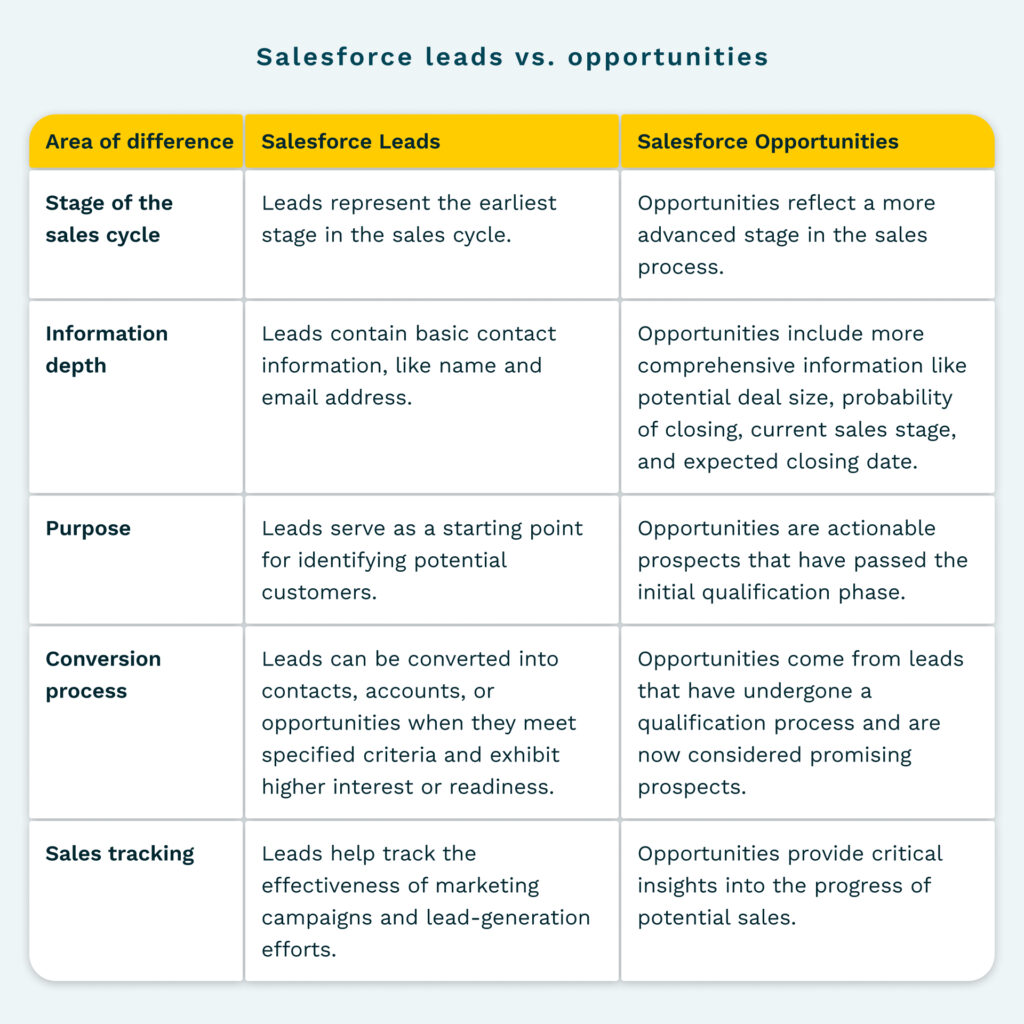
Difference 1: Stage of the sales cycle
Leads represent the earliest stage, potential customers who’ve shown initial interest but aren’t yet qualified or ready for direct sales engagement. Opportunities reflect a more advanced stage, where a lead has progressed to genuine sales potential.
Difference 2: Information depth
Leads contain basic contact information (name, email, source of interest) and limited data on specific needs. Opportunities include far more: deal size, probability of closing, current sales stage, and expected close date, the depth that actually supports revenue tracking and forecasting.
Difference 3: Purpose
Leads exist to identify potential customers who need further nurturing and qualification. Opportunities are actionable prospects sales teams actively pursue to close.
Difference 4: Conversion process
Leads convert into contacts, accounts, or opportunities once they meet specified criteria and show real interest or readiness. Opportunities, by contrast, don’t convert into other Salesforce entities, they’re worked directly toward a successful sale.
Difference 5: Sales tracking
Leads help track the effectiveness of marketing campaigns and lead-generation efforts. Opportunities provide the insight sales teams need to prioritize deals and forecast revenue accurately.
When Does a Lead Convert Into an Opportunity?
Converting a lead is a real judgment call, not a mechanical checkbox. A few practices help make that judgment more consistent:
- Qualification and engagement. Has the lead shown genuine interest, and engaged meaningfully with sales or marketing? Budget, authority, need, and timeline (BANT) are still a reasonable starting framework.
- Information completeness. Make sure the lead’s profile has enough accurate detail, contact information, organization data, relevant notes, before converting. Incomplete or wrong information downstream just creates confusion in the opportunity it becomes.
- Lead scoring. A scoring system that assigns numerical value based on behavior and engagement gives conversion a consistent, less subjective threshold rather than relying on individual rep judgment alone.
- Intent signals. A demo request, a quote request, a trial start, these are stronger readiness signals than general interest and worth weighting heavily.
- Sales team feedback. The rep actually talking to the lead usually has context a scoring model alone can’t fully capture; their read on readiness is worth soliciting directly.
Why Lead and Opportunity Accuracy Matters More Now
The core distinction between a lead and an opportunity hasn’t changed. What’s changed is what’s riding on getting the conversion and the subsequent opportunity data right. A growing share of CRM data, including exactly the stage, probability, and contact-role fields covered above, is now read and acted on directly by AI agents rather than reviewed by a person first. A lead converted too early, or an opportunity with an inflated probability field, used to just produce a slightly optimistic forecast a manager could catch. Fed into an agent acting on that same field directly, prioritizing outreach, flagging a deal as at-risk, updating a forecast category, the same inaccuracy becomes a wrong automated decision, with less human review standing between the data and the action.
This is also where Opportunity Contact Roles specifically matter more than most teams treat them. An opportunity with only the original lead’s contact attached, and none of the other stakeholders who joined calls along the way, gives both a rep and an AI agent an incomplete picture of who’s actually involved in the deal.
Nektar’s Data Foundation automatically captures the activity that determines whether a lead is actually ready to convert, and once it does, keeps the resulting opportunity’s contact roles and stage current as new stakeholders join and the deal progresses, without requiring a rep to manually update either. Buying Group Intelligence specifically fills the Contact Role gap most opportunities have: automatically detecting and mapping stakeholders from real email and meeting activity, rather than relying on whichever one or two contacts a rep remembered to add.
Frequently Asked Questions
Q. What is the difference between a lead and an opportunity?
A lead represents a potential customer with initial interest who hasn’t yet reached a stage ready for direct sales engagement. An opportunity represents a prospect who’s moved beyond initial interest and is actively being pursued for a sale, tracked with fields like deal value, probability of closing, and expected close date.
Q. What is a lead in Salesforce?
A lead is a record representing a potential customer or business that’s expressed interest in your product, containing basic contact information and details about the source of that interest. Leads are the starting point of the sales cycle, requiring further nurturing and qualification before direct sales engagement.
Q. Can you create an opportunity without a lead in Salesforce?
Yes. While leads are the typical starting point, an opportunity can be created directly, for a referral, a direct inbound inquiry, or an existing customer expansion, without ever passing through the lead object first.
Q. Why does opportunity data accuracy matter more with AI agents in the mix?
Because a growing share of opportunity data (stage, probability, contact roles) now feeds AI agents that act on it directly rather than a person reviewing it first. Inaccurate data used to just produce an optimistic forecast; now it can produce a wrong automated decision, since there’s less human review between the data and the action it triggers.
Salesforce Leads vs. Opportunities: The Bottom Line
Successful CRM management goes beyond understanding these terms, it depends on using them consistently. Build a seamless lead-to-opportunity workflow, set clear conversion criteria, and keep sales and marketing aligned on what “ready to convert” actually means for your specific business.
The part that’s easy to overlook: none of this holds up if the underlying activity data feeding it is incomplete. Get a free CRM scan to see how complete your own lead and opportunity data actually is.
Enjoyed our content? Follow Nektar on LinkedIn