
What is Salesforce Duplicate Management?
- Salesforce
- 10 min
- Updated: July 29, 2026
Duplicate data in Salesforce fills the CRM with untrustworthy data, and once trust in the data goes, so does trust in every insight drawn from it.
Duplication in Salesforce happens when the same real-world contact, lead, or account gets entered into the system more than once, sometimes as an exact copy, more often as a near-miss a matching rule doesn’t catch: “Ariana Grande,” “A. Grande,” and “Ari Grande” all describing the same person, none of them flagged as duplicates of each other by a simple exact-match rule.
The scale of the problem is well documented. CRM duplication rates commonly reach 20% or more, and 70% of organizations report struggling with duplicate or inconsistent data due to the lack of a proper matching technology.
New records introduced through integrations are especially prone to it. Research puts the share of incoming integration data that already exists in some form in the CRM at 30% to 40%.
94% of organizations also suspect their own customer data is inaccurate, with duplicates as a primary contributor.
Get our latest insights into your inbox

How Duplicate Data Is Killing Your Salesforce Effectiveness
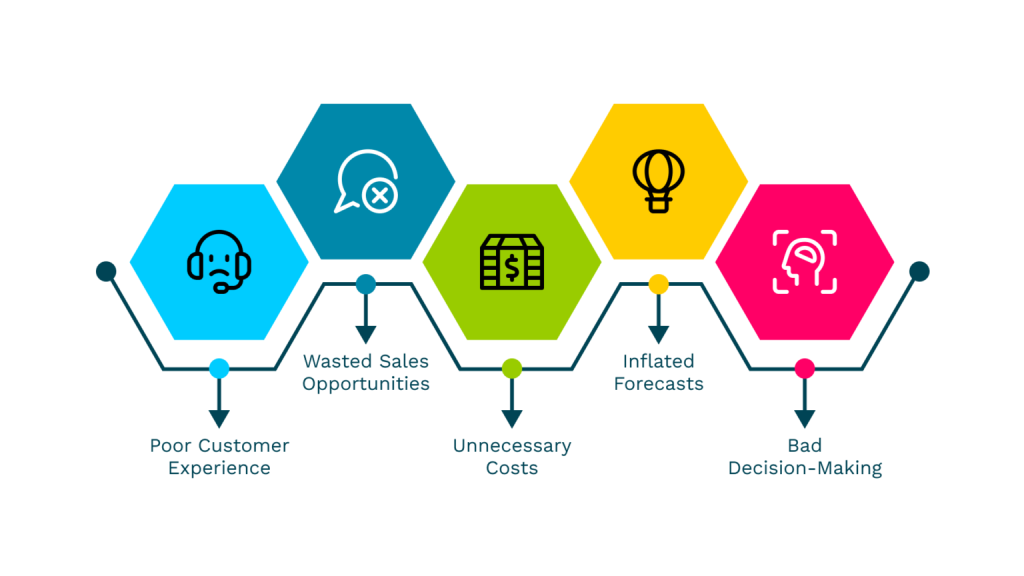
1. poor Customer experience
Receiving the same email twice, or having to repeat an issue to support because two reps are looking at two different records of the same person, is exactly the friction Salesforce is supposed to eliminate. Duplicate records do the opposite, disrupting the seamless experience the platform is built to enable.
2. Wasted sales opportunities
If a rep contacts a lead another rep is already engaging, because the two of them are working from separate duplicate records, that’s wasted time, real frustration, and a worse experience for the prospect. At scale, excessive duplicates also erode reps’ trust in the CRM itself: some start over-verifying every contact manually before reaching out, others stop checking background data altogether, both are worse than the CRM actually being reliable.
3. Unnecessary costs
Physical marketing materials sent twice to the same duplicated contact are wasted spend, plain and simple. Less obviously, some software licenses are priced per record, so every duplicate is a small, ongoing cost multiplied across the whole database. One estimate puts the cost to properly identify, review, and merge a single duplicate at around $96, which adds up fast at any real scale, a company with 50,000 contacts and a 10% duplication rate is looking at roughly $480,000 in cleanup cost sitting in its own database.
4. Inflated forecasts
Forecasting depends on an accurate count of prospects moving through the funnel. When two reps each log the same opportunity as separate records, that opportunity gets counted twice, quietly inflating the forecast past what’s actually achievable. Duplicate customer records also make it harder to get a clean view of a specific customer’s real history and preferences, which leads to misinformed strategy on that account and, eventually, a missed opportunity that looked fine on paper.
5. Bad decision-making
Good decisions start from a unified view of the customer, one record pulling together click data, transactional history, and contact information into a single picture. Duplicates break that unification, preventing a comprehensive view of any specific customer and making aggregated analysis across the broader customer base unreliable as well.
How Automation Can Resolve Salesforce Duplicate Management
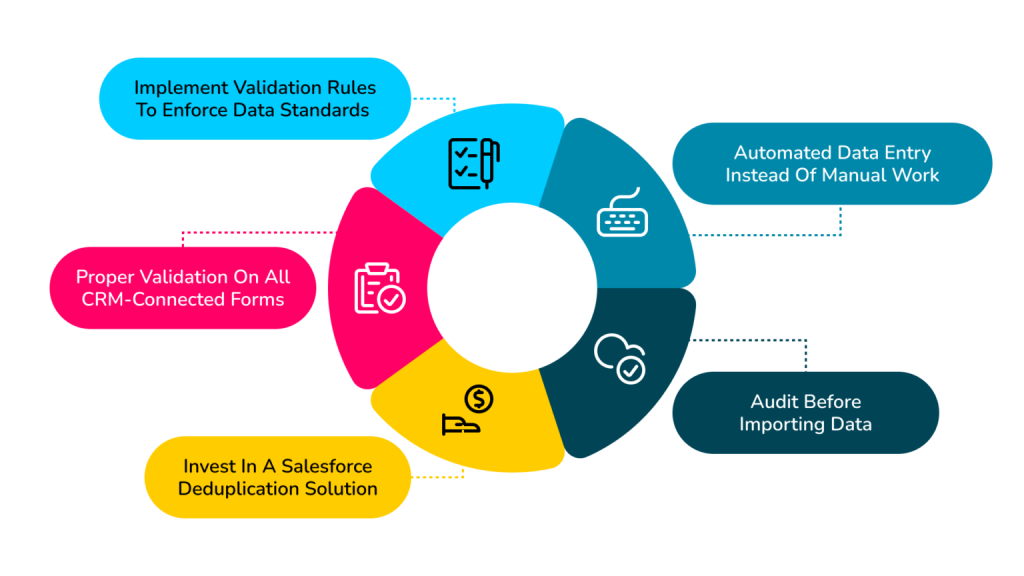
1. Automated data entry instead of manual work
Manual data entry is where most duplicates originate in the first place, 92% of duplicate records are created during initial registration or data entry, when a rep or system creates a new record rather than searching for an existing one. Automating data entry, pulling from source systems directly rather than typing records in by hand, removes that root cause rather than cleaning up after it. Automation can also check for duplicates in real time as records are created, merging or flagging them immediately instead of letting them accumulate for a future cleanup project.
2. Audit before importing data
Auditing incoming data against what’s already in Salesforce, before the import happens, catches potential duplicates before they ever enter the system. This means cross-referencing new records against existing ones and merging or discarding matches proactively, rather than importing first and cleaning up after.
3. Implement validation rules to enforce data standards
Validation rules enforce data standards at the point of entry, blocking a new contact record from being created with an email address that already exists, for instance, rather than allowing the duplicate in and catching it later. This keeps data accurate and consistent by design rather than by cleanup.
4. Proper validation on all CRM-connected forms
The same logic needs to extend to every form feeding Salesforce, not just direct CRM entry. A web form requiring a unique email address, for instance, should reject a submission that already matches an existing record rather than silently creating a duplicate lead.
5. Invest in a Salesforce deduplication solution
A dedicated deduplication solution uses matching logic well beyond simple exact-match rules to catch the kind of near-duplicates (“A. Grande” vs. “Ari Grande”) that manual review and basic validation rules both miss, merging or flagging them automatically rather than requiring a person to manually reconcile every case. This is where the real time savings show up: automating the ongoing detection and resolution of duplicates, rather than treating deduplication as a periodic cleanup project that leaves the database dirty for most of the year in between.
Salesforce Duplicate Management With Nektar
Nektar’s role here is upstream of most deduplication tools: it automatically captures contact and activity data directly from email, calendar, and meetings, and writes it into Salesforce structured against the right account and opportunity from the start, which prevents a large share of duplicates from ever being created in the first place, rather than cleaning them up after manual entry has already introduced them. Time Travel™ goes a step further, retroactively correcting historical records as new context arrives, closing gaps a one-time deduplication pass can’t touch.


Matt Baker
Head of Revenue Systems & Strategy, LaunchDarkly
We chose Nektar because it goes beyond basic domain matching, using advanced intelligence to ensure accurate opportunity data.
Here’s a more detailed look at how Nektar helps specifically with duplicate and fragmented contact data in Salesforce:
1. Improved contact lists
Nektar builds more complete contact lists for every account by extracting them directly from reps’ email inboxes, calendars, and meetings, rather than relying on manual entry that’s prone to creating near-duplicate records in the first place. Sales teams spend less time on data entry and more time actually engaging prospects and customers.
2. Clearly segmented accounts
Contacts and Opportunity Contact Roles get segmented by actual engagement level, hot, warm, cold, based on real signals like email response rates, meeting attendance, and activity recency, rather than a rep’s manual, and often duplicated, categorization.
3. Automatic buying committee mapping
Nektar’s Buying Group Intelligence automatically maps relationships between buyers and sellers by analyzing email exchanges, meeting attendance, and contact data, surfacing the real decision-making structure of an account instead of whatever fragmented, possibly duplicated contact list happened to get manually entered over time.
4. Enriched contact records
Missing job titles, phone numbers, and other contact fields get filled in automatically from real interaction data, keeping information current without manual upkeep, and without creating the kind of partial, inconsistent records that turn into duplicates down the line.
5. Leading-indicator tracking
Beyond deduplication itself, Nektar surfaces specific, actionable signals, deal risk flags, recommended next steps, drawn from the same clean, unified data foundation, so sales teams aren’t just avoiding duplicate records but actively using the resulting clean data to close more deals.
6. A larger, cleaner qualified pipeline
With duplicate and fragmented contact data resolved at the source, teams can confidently add new, marketable, first-party contacts to their qualified pipeline without worrying about inflating it with records that already exist under a different name or spelling.
Why Duplicate Data Matters More Now
Everything above has always been true. What’s changed is what duplicate data now feeds into. A growing share of CRM data, contact and account records included, is read and acted on directly by AI agents rather than displayed for a person to review first. Two duplicate records for the same account don’t just produce a slightly-off forecast anymore; they can cause an agent to miscount engagement, double-count pipeline, or route an action to the wrong record entirely, and do so at a speed no manager catches in time. Getting deduplication right at the source, rather than as a cleanup project, is a bigger precondition for safe AI use than it was when this problem was purely a human-readability issue.
Frequently Asked Questions
Q. How common are duplicate records in a typical CRM?
Current research puts CRM duplication rates at 20% or higher in many organizations, with 70% reporting real struggles with duplicate or inconsistent data due to insufficient matching technology. Records introduced through integrations are especially prone to it, with some analyses finding 30 to 40% of incoming integration data already exists in some form in the CRM.
Q. What causes most duplicate records in Salesforce?
The large majority originate at the point of data entry: a rep or system creating a new record instead of searching for an existing one first, often during initial registration or lead capture. Automating data entry and validating against existing records before creation addresses this root cause directly.
Q. Can duplicate data be fixed once and stay fixed?
Not with a one-time cleanup. New duplicates enter continuously through the same channels (manual entry, integrations, web forms) that created the original problem. Automated, real-time detection and prevention at the point of entry is what keeps a CRM clean on an ongoing basis, rather than treating deduplication as an annual project.
Q. Why does duplicate data matter more with AI agents in the mix?
Because AI agents increasingly read and act on CRM data directly. Duplicate records that used to just produce a slightly inflated forecast for a person to catch can now cause an agent to miscount engagement or misroute an action, with no human reviewing the output before it’s acted on.
Stop Managing Duplicates. Prevent Them.
Salesforce duplicate management can eliminate a real source of revenue leakage in your business, but the highest-leverage fix is preventing duplicates at the source rather than merging them after the fact.
Get a free CRM scan to see how much duplicate and fragmented data is currently sitting in your own CRM, or explore Nektar’s Data Foundation to see how automated capture prevents it from accumulating in the first place.
Enjoyed our content? Follow Nektar on LinkedIn